At the beginning of 2025, when I had just started building the MewDesign AI Design Agent, I was still using Cursor.
Back then, the workload between AI and me was roughly fifty-fifty. It completed code and edited files; I confirmed requirements, checked the results, handled what it could not finish, and personally connected testing, commits, and deployment. AI was already useful, but I was still holding the entire engineering process in my hands.
Around May, a friend recommended Claude Code. It was the first time I moved my primary continuous coding workflow from an IDE to the CLI. The transition felt unfamiliar at first, but once I adjusted, I opened my IDE less and less.
Later, I began using Codex heavily. An agent could investigate a real codebase for hours, modify multiple files, run tests, inspect Git state, work with pull requests, and even track a deployment. Today, I rarely go back and edit the code myself.
That can sound like “AI replaced the programmer.” My experience is almost the opposite. I did not leave engineering. I moved my time away from executing every step and toward deciding what is worth doing, how it should be done, what must not be done, and what evidence proves that the work is actually complete.
Looking back, the real change from Cursor to Claude Code to Codex was not how much code a model could produce in one turn. It was how far the responsibility boundary between AI and me moved upward.
I previously wrote an article explaining what Loop Engineering is. I summarized it in one sentence: stop driving a coding agent with prompt after prompt, and design a system that drives the agent instead.
Recently, I actually built that system into MewDesign. This is not a demo created to prove a concept. MewDesign is a commercial product with million-scale ARR, real users, and real revenue. If you want the product background, read the MewDesign story.
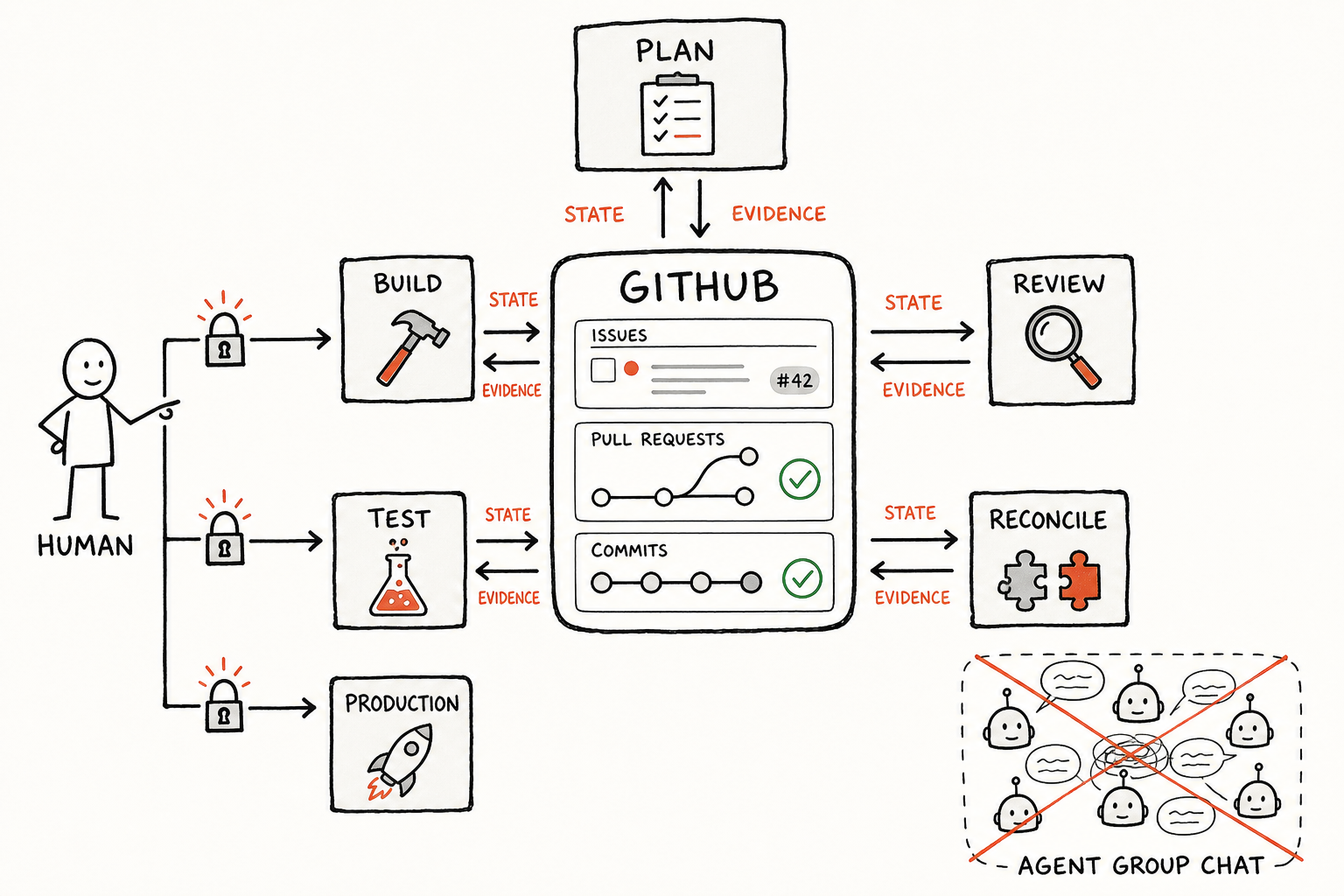
I split the original engineering process into five Agent Loops. They discover work, investigate problems, write plans, implement changes, review code, release to the test environment, and return evidence to me.
But these five agents do not hold meetings in a group chat. They are not carried by a new agent framework either. They run inside an engineering system built from GitHub, Skills, and a Harness.
This article does not expose our internal implementation or narrate a development diary. I want to explain why the system took this shape, and how to build the first Agent Loop that can genuinely work inside a commercial product.
01 - From Helping Me Code to Moving Engineering Forward
In the Cursor stage, AI mostly handled the Inner Loop inside the code: understand the current file, generate a change, and fix local errors. I handled the Outer Loop around the code: discover work, confirm requirements, control scope, judge results, and move testing and deployment forward.
Claude Code and Codex made the Inner Loop longer and more capable. But as long as every state change required me to return and type “okay, continue,” I was still the manual scheduler for the entire process.
The real engineering bottlenecks gradually stopped being code generation. They became questions like these:
- Where should the agent discover its next task?
- Which requirements are confirmed, and which are still assumptions?
- What exactly counts as done?
- When the code changes, are old reviews and approvals still valid?
- After an interrupted run, how does the next run recover instead of starting over?
- Which actions can be automated, and which must return to a human?
Together, these questions form the Outer Loop beyond the code: requirements, state, authority, verification, release, and feedback.
That is why I practice Loop Engineering. The goal is not to make Codex write more code in one run. The goal is to stop requiring me to push every step forward manually. The system should know its current state, what it is allowed to do next, which Skill it needs, and what evidence allows it to continue.
02 - Much of Multi-Agent Design Is Just Role-Playing
A common Multi-Agent setup looks like this:
Planner Agent creates the plan
-> Coder Agent writes the code
-> Reviewer Agent checks the work
-> Manager Agent decides whether it is done
The roles look clear, but the system often has several structural problems.
Problem one: different roles do not create independent judgment
If several agents use the same model, similar context, and the same mistaken premise, the Reviewer may simply restate the Coder’s conclusion in a different tone.
Adding “you are now a strict reviewer” to a system prompt does not produce independent verification.
Real independence comes from different evidence: the actual diff, test results, the rendered page, runtime logs, permission boundaries, and user acceptance. It does not come from job titles inside prompts.
Problem two: agent-to-agent retelling loses context
Many Multi-Agent orchestrations ask Agent A to summarize for Agent B, which then summarizes for Agent C.
Every retelling compresses information and adds interpretation. The final executor may receive a third-hand summary instead of the original requirement.
If the original issue, decisions, code state, and verification evidence already live in a shared system, why should an agent learn the facts from another agent’s retelling instead of reading them directly?
Problem three: multiple agents can amplify uncertainty into consensus
One agent guesses incorrectly. A second continues from that premise. A third performs a formal-looking review. The three agents end with an apparently consistent conclusion.
That is not consensus. It is one error repeated three times.
Problem four: the number of agents is not a system capability
Adding more agents is easy, and it makes for an impressive architecture diagram.
It also adds tokens, latency, repeated context, and intermediate state that must be coordinated. If a task has no meaningful permission separation, parallel value, or independent verification requirement, one agent can often do the work more cleanly.
So I do not evaluate a Multi-Agent design by asking how many agents it uses. I ask:
Do these roles have different triggers, context, permissions, completion criteria, and stop conditions?
If not, they are probably just several chat windows with different names.
03 - My Five Agents Do Not Talk to Each Other
The five MewDesign Agent Loops correspond to five responsibilities in the engineering process.
A Loop here is not a permanently online agent waiting to speak. It is an independent cycle that wakes on a specific state, completes a bounded piece of work, and stops.
| Agent Loop | Core responsibility | Authority it does not have |
|---|---|---|
| Issue Planner | Investigate a problem and produce a confirmable plan | Cannot write code directly |
| Approved Builder | Implement a confirmed plan | Cannot expand the approved scope |
| Preview Guardian | Review the current change and maintain review state | Cannot casually modify someone else’s branch |
| Test Release Controller | Release an approved version to test and verify it | Cannot release production |
| Master Reconciler | Reconcile evidence and local engineering state | Cannot automatically merge the production branch |
There are five roles because five happens to match the real permission boundaries, not because I like the number.
The Planner can read broadly but cannot write code. The Builder can write code but only inside confirmed scope. The Guardian can block a change but cannot redesign the product under the cover of review. The Test Controller can operate the test environment but cannot touch production. The Reconciler proves that the work is closed out; it cannot turn “looks complete” into “automatically declared complete.”
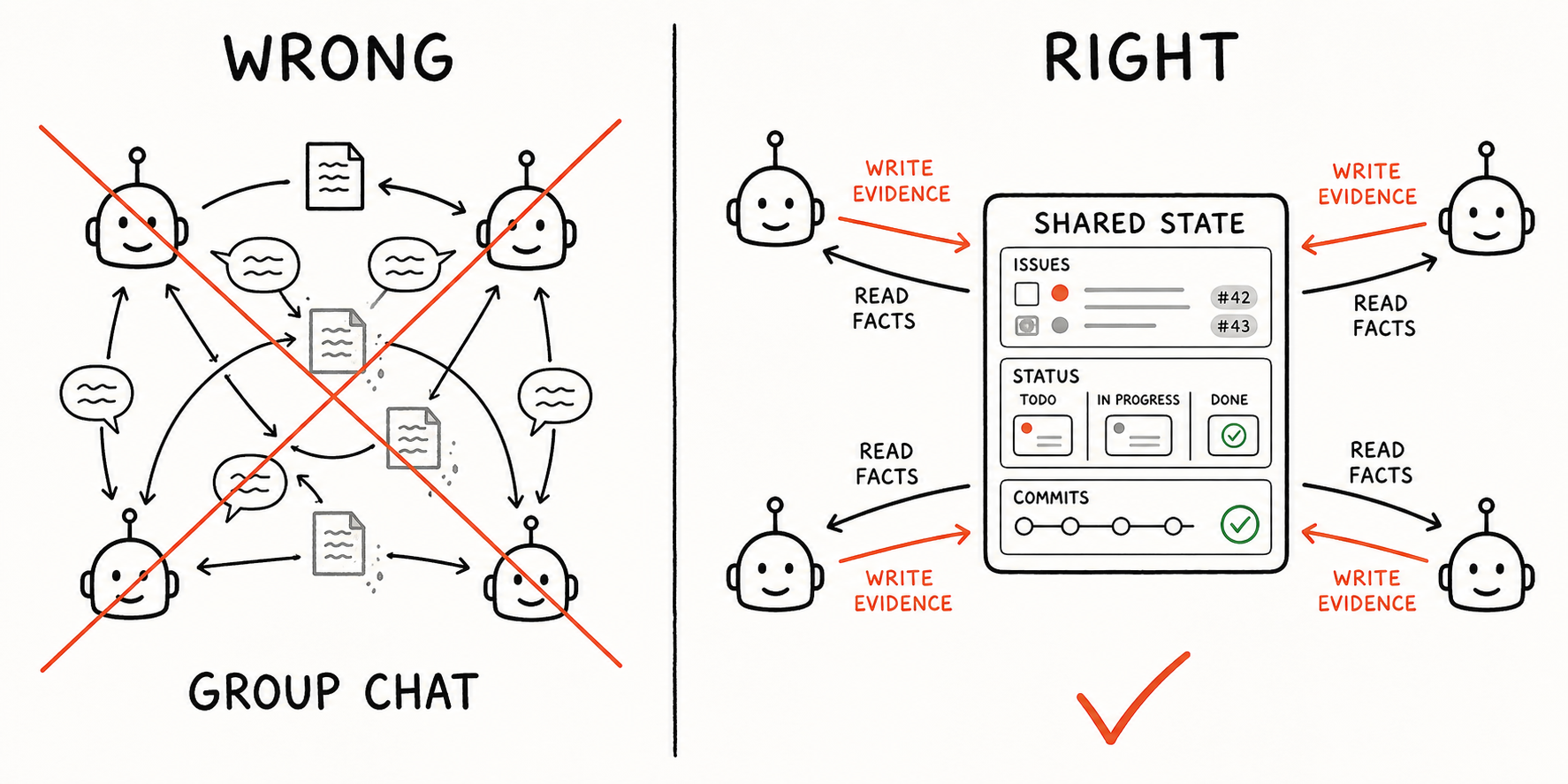
The agents do not need to talk directly.
The Planner does not open another agent session and say, “I am done; it is your turn.” It writes the plan and state back to GitHub.
When the Builder wakes up, it does not trust a verbal summary from the Planner. It re-reads the issue, the approved plan version, the current code, and the latest production baseline before deciding whether the plan is still valid.
The Guardian does not trust the Builder’s claim that “all tests passed.” It reads the current PR head, the actual diff, CI, and test evidence.
Every agent works against the same external fact system rather than another agent’s memory.
That is the Multi-Agent form I find more defensible:
Agents do not exchange beliefs. They exchange persisted state and evidence.
I split work across agents only when different stages genuinely need different context, permissions, independent evidence, or asynchronous waiting. Without those boundaries, adding agents only adds context forwarding and coordination cost.
04 - Why I Chose GitHub
I could have created a new database, designed workflow tables, and built an agent orchestration dashboard.
I did not.
For software engineering, GitHub is already a mature human-and-agent collaboration system.
An Issue is a natural context container
A good Issue should already contain:
- Why the work matters
- What is currently wrong
- How users are affected
- Which approaches were discussed
- What is outside the current scope
- What decision was made
This information works for both humans and agents.
For a teammate, the Issue is the collaboration entry point. For an agent, it is durable task context that continues to exist after a conversation ends.
Compared with packing every detail into one prompt, an Issue also lets people intervene, correct, and add context at any time, with every change recorded.
GitHub already has the skeleton of a state machine
An Issue is more than a requirements document.
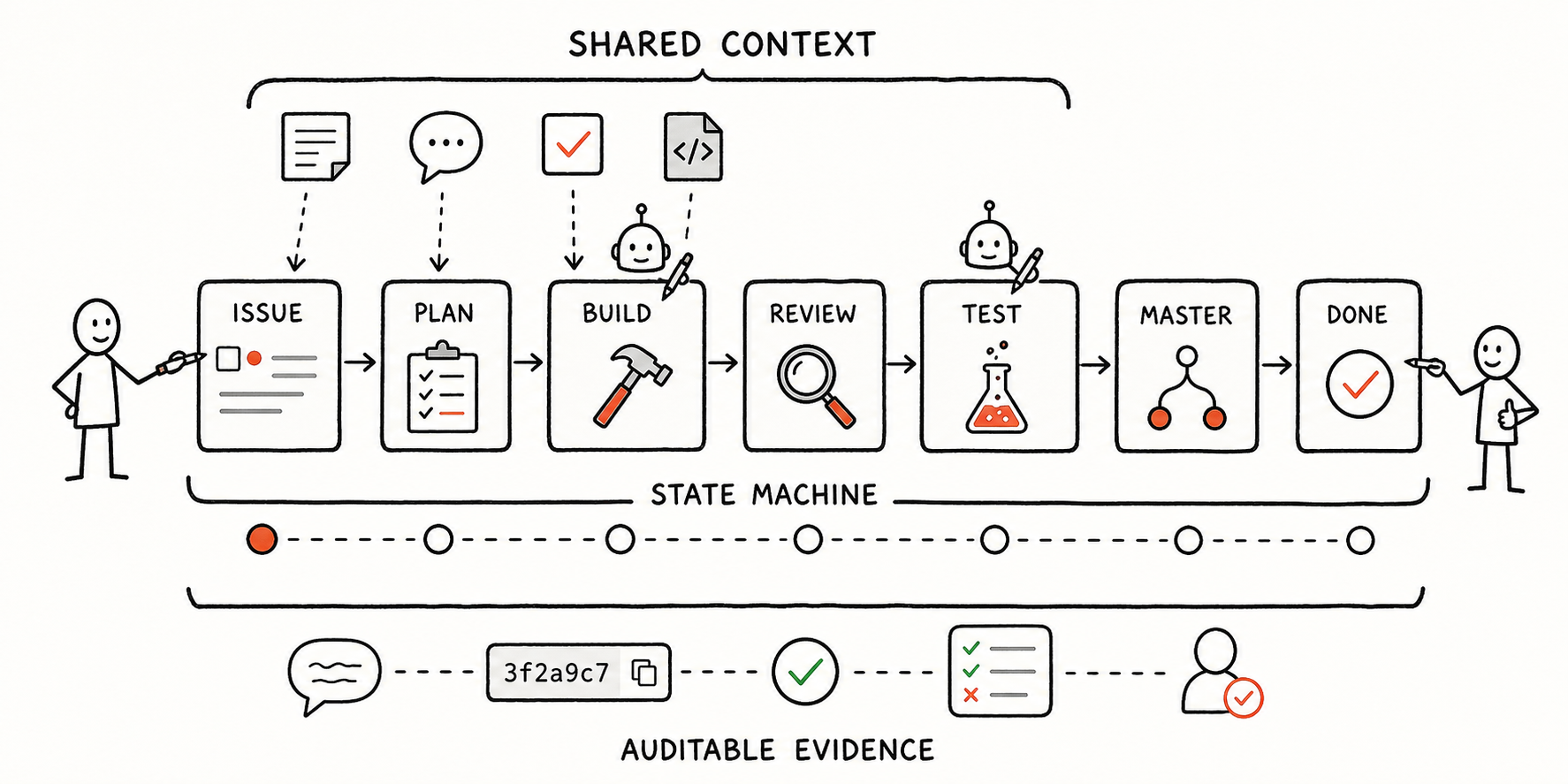
Labels, Project status, comments, PRs, reviews, commit SHAs, and Actions describe the current state of a task. Add explicit transition rules, and they form an engineering state machine:
Ready
-> Plan awaiting approval
-> Building
-> In review
-> Awaiting test authorization
-> Test verified
-> Awaiting production release
-> Done
State transitions also come with events: someone approves a plan, a PR receives a new commit, CI passes, review finds a blocker, or the test environment is verified.
The agent does not have to remember where the task stopped. On every run, it re-reads live GitHub state and applies the transition rules to decide whether it owns the next step.
GitHub works for humans and agents at the same time
If state lives only in an agent-specific database, people struggle to understand why the agent made a decision. If it lives only in chat history, the rest of the team cannot participate.
GitHub sits in the middle:
- Humans discuss, approve, and reject work in familiar Issues and PRs
- Agents read and write through structured interfaces
- Comments and reviews form an audit trail
- A commit SHA binds evidence to one exact code version
- Actions provide machine-generated verification evidence
- Notifications, permissions, and team collaboration already exist
I do not need to reinvent engineering collaboration for agents. I need agents to enter the system people already use.
GitHub makes tasks recoverable
Agent runs get interrupted. Models forget. Context gets compressed.
But if the important state has been written back to the Issue, PR, and commits, the next run can reconstruct the scene: whether the plan was approved, where the code lives, which head is current, which findings were fixed, and whether the test environment was verified.
This is more reliable than trying to give the agent a longer memory.
I have always liked this line: agents forget, but engineering records do not.
I would now add another one: for an engineering agent, GitHub is the long-term memory it shares with humans.
05 - How Skills and the Harness Work in a Real Product
With only GitHub state and scheduled triggers, the system would still be little more than a task scheduler.
MewDesign is a continuously running commercial product. Engineering is not just “write code.” A requirement moves through investigation, plan approval, implementation, review, testing, build, release, runtime verification, and team communication. A production problem may continue into logs, data, or agent-runtime traces.
These stages have different context, tools, permissions, and risk. Putting all of them into one all-powerful agent with a giant system prompt does not create a universal engineer. It creates a model that has trouble knowing when it has crossed a boundary.
So I did not write one universal Skill. I split accumulated experience into narrow Skills: a collaboration Skill owns Issues, PRs, and task state; a testing Skill selects verification based on the change; a deployment Skill owns deployment prerequisites, authorization, and execution; an operations Skill reads runtime state by default; logs, databases, and the agent runtime each have their own investigation boundaries.
How one task moves across Skills
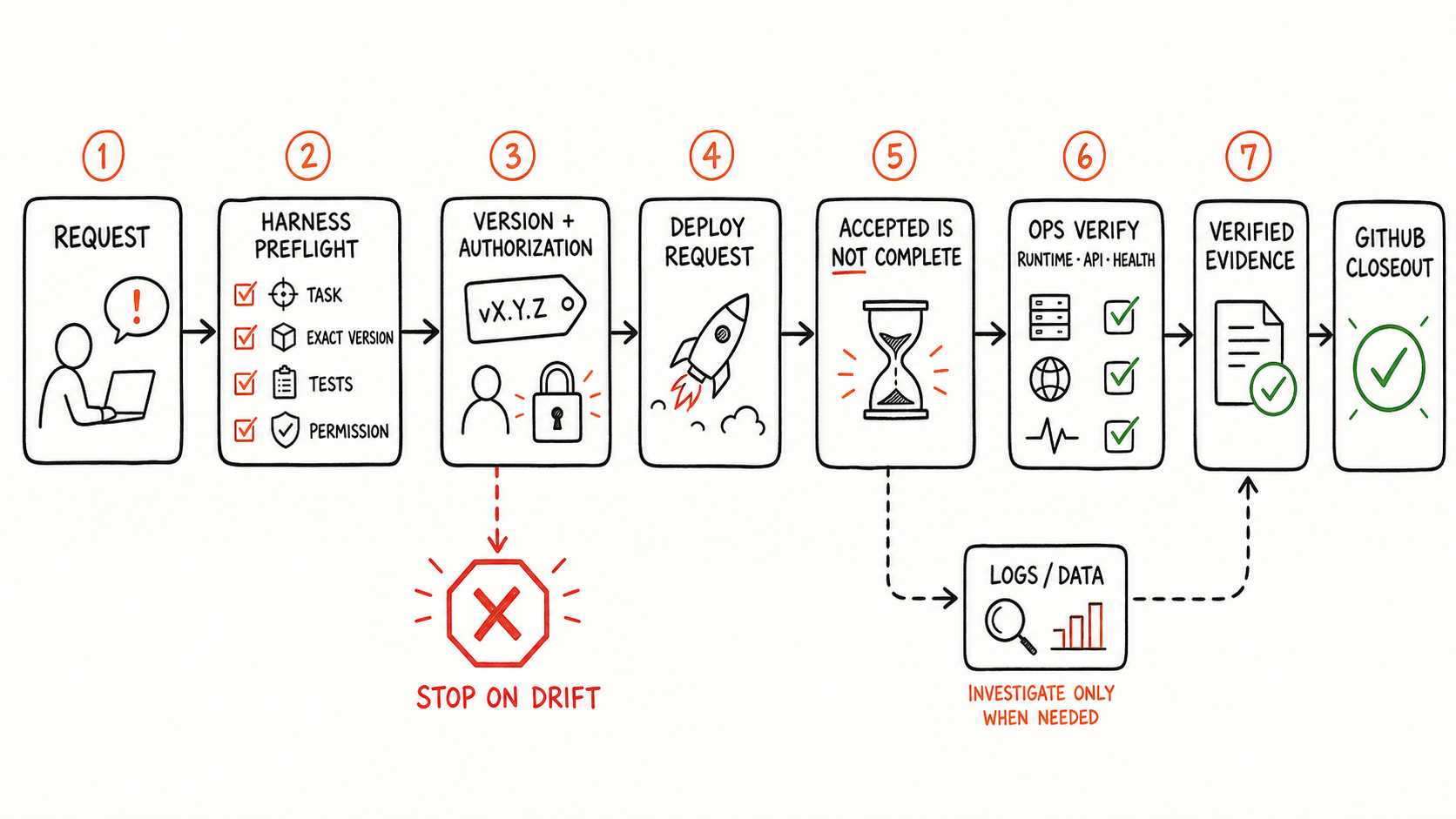
Take a test release. “Put this version in the test environment” sounds like one command. Inside my Harness, it is split across several Skills.
The collaboration Skill first confirms the requirement, PR, exact version, and affected surface, then checks review, tests, and CI. Only then does the deployment Skill take over environment confirmation and execution authorization. The authorization is bound to the current version; if the code changes, the old approval expires.
A successful response from the deployment entry point is not the finish line. It proves only that the request was accepted. The operations Skill still verifies the actual running version, service health, and external interfaces in read-only mode. If evidence points to a problem, it hands a bounded time window and question to the logs or database Skill instead of letting the deployment agent investigate outside its authority.
Only after the evidence passes does the collaboration Skill update GitHub state and communicate the result. No agent can skip the next layer of verification by saying, “I think it is done.”
A Skill captures an operating contract, not just knowledge
By Skill, I do not mean a role prompt that says, “you are a senior engineer.” I mean an operating contract that can be reused, reviewed, and continuously revised.
| Type of work | What the Skill actually fixes in place |
|---|---|
| Requirements and planning | Required facts, Scope and Non-scope, and ambiguity that must return to a human |
| Code review | The exact diff to inspect, how to judge tests and CI, and which findings block progress |
| Deployment | How environment, version, and authorization bind together, and which missing preconditions block execution |
| Operations | Read-only by default, how to distinguish an in-progress rollout from completion or failure, and which actions need new approval |
| Logs and data | Time window, minimum necessary scope, sanitization, and when the result is only a hypothesis |
These Skills normally answer six categories of questions: scope, required context, permitted tools, authority boundaries, completion evidence, and stop conditions.
The important part is that the rules evolve through incidents.
- A deployment request once returned successfully before the runtime had actually updated, so “request accepted is not outcome complete” became a mandatory verification chain.
- Code changed after approval, so authorization became bound to an exact version and automatically expired on drift.
- Interrupted tasks resumed and risked repeating work, so consequential actions became recoverable and idempotent instead of creating duplicate PRs, releases, or notifications.
- Investigations expanded beyond their original evidence surface, so logs and databases became aggregate-first, read-only, and minimum-scope by default.
If a failure remains only in my memory, the next agent can repeat it. When it becomes a Skill backed by tools and tests, it becomes reusable engineering knowledge.
The Harness is a responsibility router, not a toolbox
Skills alone are not enough. Writing “do not touch production” in a document does not make an agent with full permissions safe.
The Harness gives the agent access to the repository, GitHub, tests, the browser, logs, data, and deployment capabilities. It also decides which capabilities the current task may load, who may change each class of state, and when work must be handed to a different specialist Skill.
The deployment Skill should not write SQL. The data Skill should not restart a service. The operations Skill should not merge code on behalf of the collaboration Skill. Once responsibilities are separated, each Skill can have smaller permissions, clearer inputs and outputs, and independent stop conditions.
I now think of the system in four layers:
GitHub: stores the current task state
Loop: decides when to run and when to stop
Skill: defines how this kind of work should be done
Harness: provides tools and environment, and enforces permissions, verification, and recovery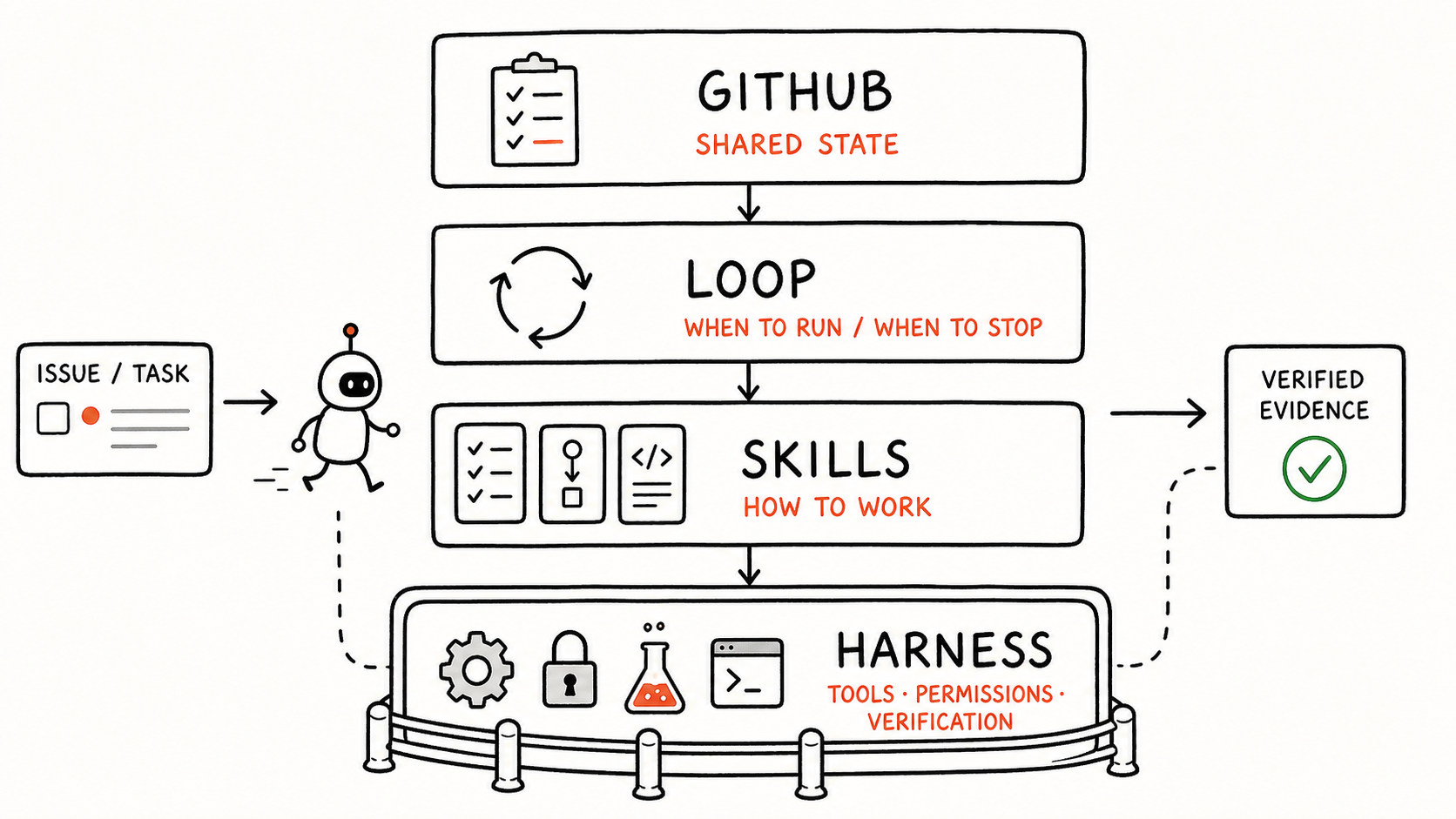
When a Loop wakes up, it does not begin with one giant universal prompt. It loads the relevant Skills for the current state. The Harness routes the task to the right capability, lets it act inside its allowed boundary, and writes the result and evidence back to GitHub.
This is why the same model can feel like two completely different operators in a plain chat window and inside a mature Harness. Model capability determines how far it can reason. Skills and the Harness determine whether it can finish real work consistently.
The five Agent Loops are the visible shell. The durable asset is the set of Skills, tools, and constraints that have been revised, versioned, and tested by real incidents.
06 - Build Your First Agent Loop Step by Step
If you want to build a Loop Engineering system, do not begin by copying five agents.
Choose one piece of work with clear boundaries and an easily verifiable outcome. Build one Loop. Once it runs reliably, split the next Loop only along a real responsibility boundary.
Previously, I moved Codex through chat:
Analyze this first
-> Okay, start the implementation
-> Review it again
-> Fix this finding
-> You may release it to test
Turning that conversation into a repeatable Loop requires at least six steps.
Step one: define the Trigger
Write down the state change that wakes the agent. A trigger should be a machine-readable fact: an Issue enters a particular state, a PR receives a new commit, or test authorization is bound to the current version.
“Check when you have time” and “continue when it looks ready” are not triggers. An ambiguous trigger merely moves human hesitation into the automation.
Step two: specify the Context
List the facts the agent must re-read on every run. It should not depend on remembering the previous conversation. It should reconstruct the scene from the Issue, plan version, code, PR, CI, and latest verification evidence.
The goal is not to load more context. The goal is to decide what counts as the source of truth. If the same fact has one version in chat, one in a document, and another in an Issue, the agent will only become more confused.
For code work, Context also includes Base, Head, and branch origin. A file diff says what changed; it does not say where the change came from or where it is meant to go.
Step three: define Authority
Specify what the agent may change and what it must never change.
For example, a Review Loop may read the full PR, submit a review, and update review state, but it cannot casually edit the development branch. A test-release Loop may operate the test environment, but it cannot continue into production because tests passed.
I require every plan to state Scope and Non-scope together. Otherwise, an agent can find a reasonable explanation for each additional change and quietly turn a small requirement into a cross-module project.
Step four: design the Verifier
Assign external evidence that verifies every action. A test command exiting with zero, green CI, a working page, and a running production version prove four different things. They are not substitutes for one another.
The Verifier should ideally use evidence the executor did not use to reach its conclusion. Otherwise, verification may be nothing more than asking the agent to agree with itself again.
Step five: define Stop
List the states that must stop the Loop and return authority to a human: ambiguous requirements, a changed plan version, a PR head that no longer matches authorization, work crossing Non-scope, or a task touching production data or financial logic.
A reliable Loop must know not only when to continue, but when to shut up.
Step six: define Write-back
Specify where the agent records its result and the minimum evidence it must leave behind. The next run should be able to determine what happened, how far the previous run got, and why it stopped using only these persisted records.
In MewDesign, these become machine-readable state changes:
- The Planner investigates only when an eligible Issue enters the ready state
- The Builder receives implementation authority only after I approve a specific plan version
- The Guardian reviews again when the PR head changes
- The Test Controller releases only after the current version passes review and CI and receives exact authorization
- The Reconciler closes out only after the production branch is merged by a human
Every Agent Loop can be expressed with the same structure:
Trigger: What state change wakes me?
Context: Which facts must I re-read?
Authority: What am I allowed to change?
Verifier: What evidence proves success?
Stop: Which conditions require me to stop?
Write-back: Where do I persist the result?
A minimal PR Review Loop might look like this:
Trigger: The PR head changes and enters the review state
Context: Original Issue, approved plan, Scope / Non-scope, Base, Head, Diff, CI
Authority: Submit review, mark blockers, update review state; cannot edit the development branch
Verifier: Bind the verdict to the current commit SHA and cite code, test, or page evidence
Stop: Unclear requirement, another head change, or a high-risk issue outside authority
Write-back: Record the verdict on the PR and synchronize Issue state
That is already a complete Loop. It does not need another agent to assign work, and it does not need a permanently open conversation. Whenever the trigger is true, it re-reads the facts, acts within authority, leaves evidence, and stops.
These six questions matter more than writing an impressive role prompt.
A prompt answers, “how should it think?” A state machine answers, “is it allowed to act now?” The system is no longer driven by the human’s next sentence. It is driven by shared state changing.
07 - Humans Do Not Leave the Loop; They Become the Authority
Human in the Loop is often interpreted as “let the agent finish, then ask a person to click confirm.”
That is too coarse.
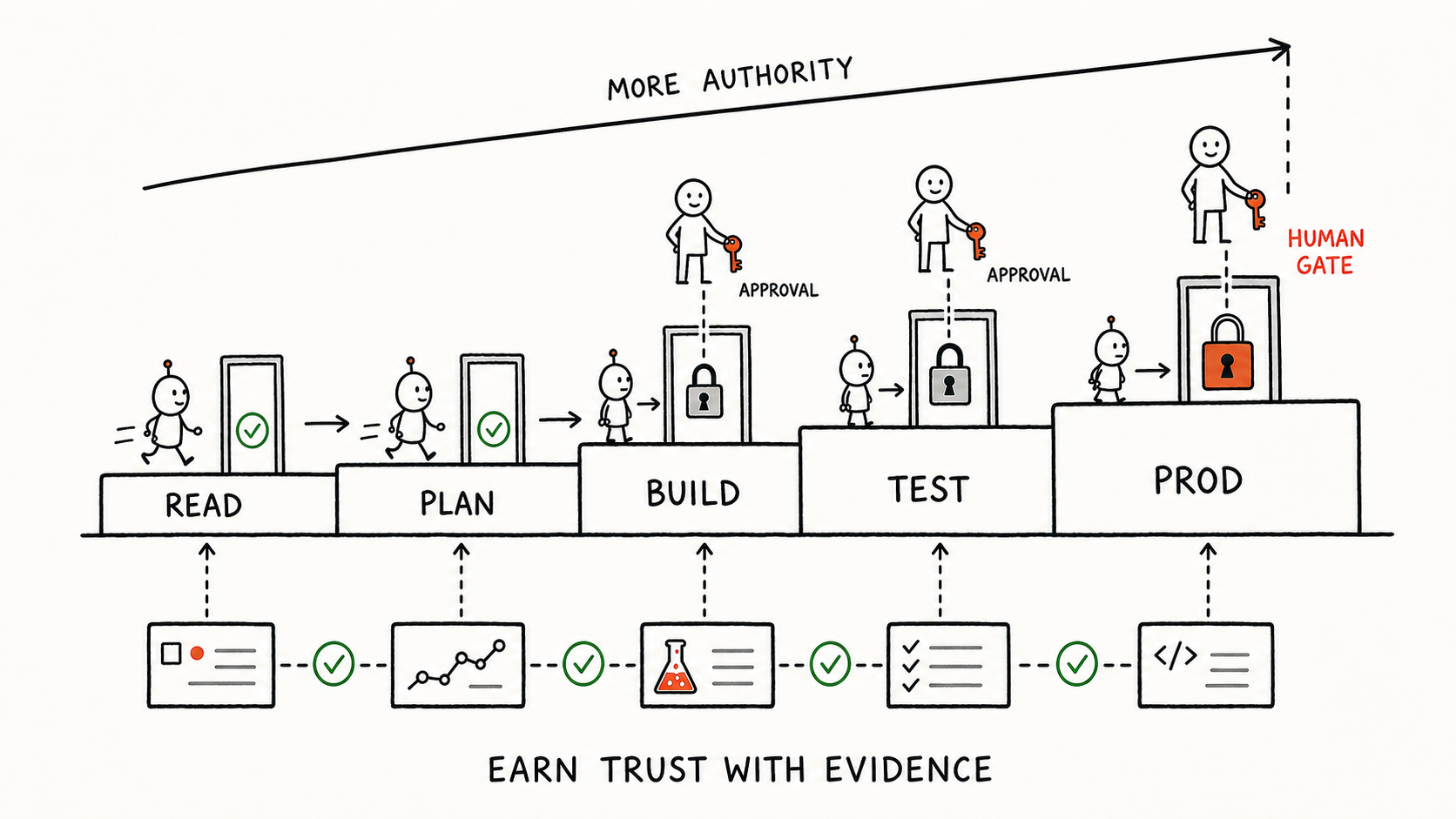
The human’s value is not stamping the agent’s result. It is retaining the final decision over high-consequence state transitions.
In MewDesign, I keep several explicit human gates.
Plan Gate
The agent may investigate and propose a plan, but the Builder can begin only after I approve one specific version.
If the plan changes, the old approval expires. The agent cannot use a vague “looks good” to execute a requirement that has since changed.
Code Version Gate
Test authorization is bound to a specific commit SHA, not to a broad statement that “this PR may be released.”
If the PR receives another commit, it is no longer the version I approved, and the old authorization cannot be reused.
Production Gate
The test environment may advance automatically when boundaries are clear and evidence is sufficient, but production still requires independent approval.
High-risk work involving payments, permissions, database migrations, production data, or traffic changes does not enter automated implementation merely because the Planner believes the plan is clear.
The same boundary applies to the entire V1. It does not resolve ambiguous product decisions, perform database migrations or production data writes, change traffic, merge the production branch, release production, or declare completion without evidence.
These are intentional responsibility boundaries, not missing features. They expand only as verification becomes more reliable, not simply because the model becomes more capable.
This design does not reduce human authority. It reduces the number of steps a human must personally execute.
I do not have to sit at a terminal and tell the agent its next command. I still decide what is worth doing, which version may enter a shared environment, and when the system may accept production consequences.
An agent should earn authority through long-term reliability, not one impressive demo.
08 - Loop Engineering Is About Closure, Not Repetition
On the surface, this system automates Issues, code, PRs, and releases.
A more accurate description is that it automates the flow of state and evidence.
The Planner writes requirement evidence back to GitHub. The Builder reconstructs context from shared state and writes back implementation evidence. The Guardian and Test Controller follow the same pattern. No agent hands a conclusion directly to the next agent; every handoff first becomes an engineering record that can be read and verified.
Each role completes only a bounded segment, but together they form a loop that can continue, pause, recover, and remain accountable.
If I had to define Loop Engineering again, I would say:
Loop Engineering is not about keeping an agent running forever. It is about designing goals, state, authority, evidence, and stop conditions into a system that can run repeatedly.
I used to say: AI executes; humans judge.
Now I would add:
GitHub preserves shared context, the state machine decides who may continue, and evidence decides whether the work is complete.
MewDesign is not a universal answer, but it has convinced me of one thing.
The future of software engineering will not be only “one person with a stronger coding agent.” It will look more like humans and multiple constrained agents working on the same shared, persistent, auditable engineering state.
The important design question was never what agents should say to one another.
It is what each one owns, and when it must shut up.
If you want to see the product this engineering system supports, try the MewDesign AI Design Agent or read the MewDesign documentation.