I actually started preparing this series three months ago. Then the new job got too busy, and I worked so hard I forgot about it.
A few days ago, I happened to see a report about GPT-6 and remembered that this draft still existed. So I quickly dug it out, revised it, and handed in the homework.
As for why I am using this image, and why the blood-and-tears story starts with Tools:
It is because, look, even in the GPT-6 era, Tools are still the foundation for AI Agents to land. As the image shows, even if AI models keep evolving, a physical attack is still a physical attack. Tools are still Tools. They have not turned into magic attacks.
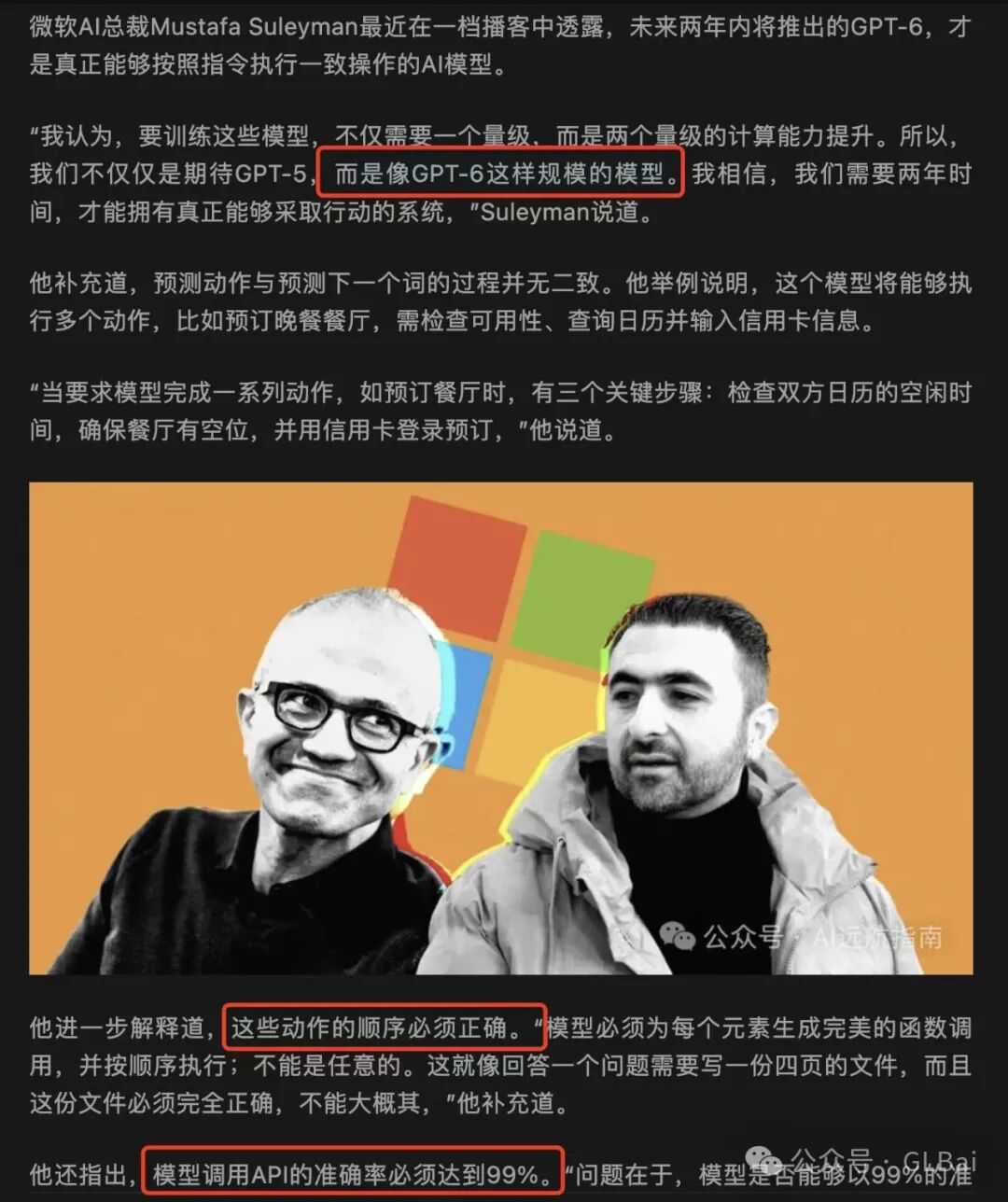
01 - Preface: Start from an API Request
If you look at the world from a technical perspective, it is not actually that sci-fi. Large models are the same. GPT-5 and GPT-6 will be the same too.
In the traditional internet era, every function had individual APIs behind it.
input params -> request -> returned resultThen UI and frontend packaged these scattered APIs into a function presented to users.
For example, a login page:
-
User input: username and password
-
Backend request: verification API
-
Returned result: success or failure
If correct, return Yes and login succeeds. If incorrect, return No and tell the user the account or password is wrong.
The arrival of large models slightly changed this interaction.
An Agent can directly take your data and request login. Ignore data security in this example.
But the login API behind it is still the login API.
The appearance of AI Agents did not change this essence. It simply replaced manually written rules with AI decision-making.
Tools are the key that help AI Agents generate correct API request parameters in this process.
02 - Origin: The Charm of Large Models Is Not That They Are Text Spitters
It is that they can connect the world together.
When I first learned about ChatGPT, I happened to be solving a hard problem:
How can I quickly extract structured candidate information from a pile of unstructured data and submit it into the system?
The data users entered was strange and had no fixed rules. It could look like this:
“Baisu, male, brilliant, phone 18856888898, lives at XXXXXXXXX”
Or it could simply be a blob of text. I tried many solutions, and all were difficult.
In the end, I wrote a huge block of regex.
Later I learned about GPT. Then my Dao heart collapsed.
After all, one prompt erased a month or so of my effort.
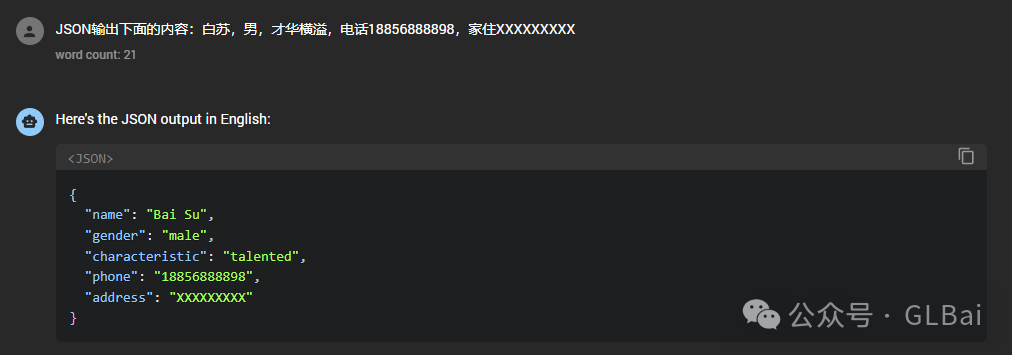
What made me collapse even more was discovering that this output could directly become the input parameters for uploading candidates in my system. Wasn’t that automation?
The upload-candidate API looked like this:
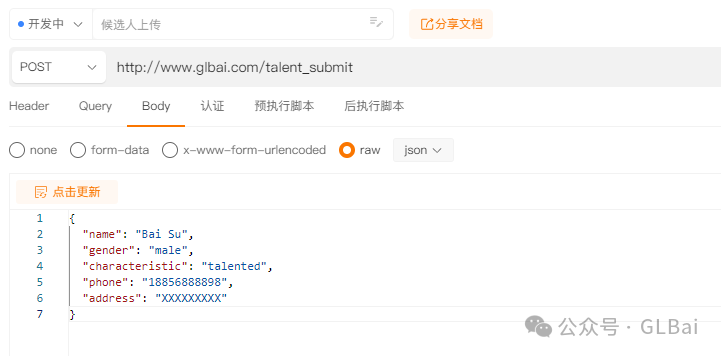
I can describe this more concretely.
Many people have used shipping apps. When entering an address, you paste in a chunk of text and the app fills the fields automatically. If it cannot recognize the text, you have to fill in each blank manually.
After automating with a large model, I only need to give users one text box. They paste a blob of text, and I submit it automatically.
This was still the end of 2022. There was no Function Calling, no Tools, and Sam had not yet shown everyone ChatGPT ordering takeout for you.
03 - Exploration: JSON Output Let Large Models Peek into the Real World
Around the same time last year, there was a joke that GPT-4 could jailbreak itself.
Self-media kept spreading that story until it became more and more mystical. But in fact, relying on the large model alone was unrealistic.
Because it really could not directly touch the real world. The model did not even know the current year, month, or day.
Continuing with the example above:
As long as we can make the model output structured information according to our definition, we can do many interesting things.
JSON is a very good choice.
Based on this idea, we explored many things:
- Template-free Excel import
Change the traditional data import method. No more complex business logic. You only need a prompt to read the columns you want.
- AI reviewer
Add an AI review step before human review. With some know-how and few-shot examples, outputting yes or no is simple.
- Classifier
There are many classifier scenarios. In the past, if you wanted a classifier, you more or less had to train a model. Those were truly the golden years for algorithm teams.
Now one prompt solves it.
- Other business scenarios
Useful. Really too useful.
But the large models back then were still too immature. The path was passable, but walking it was bumpy.
04 - Savior: Function Calling and the Arrival of Tools
Why abandon JSON Output?
Before OpenAI’s Function Calling arrived, many people had already realized such a thing was needed, because Action is indispensable to an Agent.
At that time, OpenAI was still working hard on its Plugin store, which later died, while domestic model vendors were still busy naming things.
Some great builders also implemented impressive things through this route:
Early LangChain Agent implementation and Output Parser.
AutoGPT’s explosion, Planning & Execute, and later BabyAGI.
And many more.
But JSON Output naturally has many flaws:
-
JSON format is very strict. One wrong token and it breaks.
-
Context windows were still short then. The whole window was only 4096 tokens. GPT-4 had 8K and 32K, but it was expensive.
-
It is hard for a model to complete multiple complex tasks in a single request. Even today, it is hard.
-
Large models talk too much. You must keep emphasizing: “Do not say nonsense.”
-
Engineering complexity and maintenance cost are high.
And many more reasons.
The image below is AutoGPT’s prompt at the time. This sentence was indispensable.

In OpenAI’s 0613 version, Function Calling was updated.
That night, I was so excited I did not sleep. I changed requirements overnight. Elegant. It was just too elegant.
Function Calling greatly reduced the difficulty of developing LLM applications:
-
Prompt maintenance cost went down. System Prompt and Function became decoupled.
-
Hot-plugging became possible. You could quickly create a tool through JSON Schema, such as Search. Anyone could use it. Plug it in and go.
-
Engineering and business became decoupled. Previously, using JSON Output required designing flowcharts for different business processes. Engineering had to judge which node used which prompt template, and what the next node was.
Now, one loop is enough.
As long as Function Calling exists, continue.
Otherwise, end.
The real paradigm shift in application development brought by large models started with 0613.
Later, OpenAI upgraded Function Calling into Tools, the 1106 version. The reason is unclear.
Tools and Function Calling differ mainly in syntax. Tools are one level higher. At the same level as Function Calling are OpenAI’s own packaged tools, Code Interpreter and File Search, meaning RAG.
My personal guess is that OpenAI wanted to push its own GPTs. Without scenarios, it is hard to retain users. I have written about this before.
The 1106 upgrade also brought a new feature: Tools can be called in parallel.
But the 1106 version was probably rushed to match DevDay. Both 3.5 and 4 had many abnormal issues with Tools, which were not improved until later in the 0125 version.
05 - Improvement: Make Your Agent More Controllable Through Tools
Above, I talked about four ways to implement Function Calling:
JSON Output: use prompts to make the model output JSON.
Pros and cons: Prompting is troublesome, output is unstable, and chaining business flows is costly.
JSON Mode: official JSON Output, released alongside Tools in 1106.
Pros and cons: JSON format is stable, but its scenario is different from Tools. JSON mode exists to output JSON. Tools exist to call APIs.
I will not repeat Function Calling and Tools.
From a controllability perspective, I still recommend Function Calling and Tools.
- Give up JSON mode.
As model capability improves, the model can output JSON accurately, but it will still make mistakes. It cannot guarantee 100% correctness.
Model vendors do fine-tune optimization for Function Calling. Some say there is a dedicated MOE expert, though there is no way to verify it.
- Reduce dependence on System Prompt and simplify complexity.
If you write too much in the System Prompt, you cannot guarantee the model will follow it well.
Anything that can be written into Tools should be written into Tools.
- Enhance prompts through API Response.
Actually, everything input into the model can be considered prompt. Similarly, Tool call results, meaning API Responses, are returned to the model.
At this step, you can add constraints and hints for the model. Accuracy here is very high, roughly above 95%.
- Let the model choose, rather than fill in blanks.
Make fixed answers into options for the model, for example using Enum.
On one hand, it reduces token output and improves speed.
On the other hand, accuracy is higher.
- Use Tools for routing and build Multi Agent.
If one is not enough, use two. If two are not enough, use four.
Every field has its specialists. The Agent world is the same.
06 - Future: How Tools Push Agents Toward Intelligence
My friends and I followed the iteration of OpenAI’s model capabilities across versions and mapped them pretty clearly. Although there is no official explicit explanation, judging from the iteration path of each model version, Tools are very likely OpenAI’s bet on AGI.
The report screenshot at the start also proves this point.
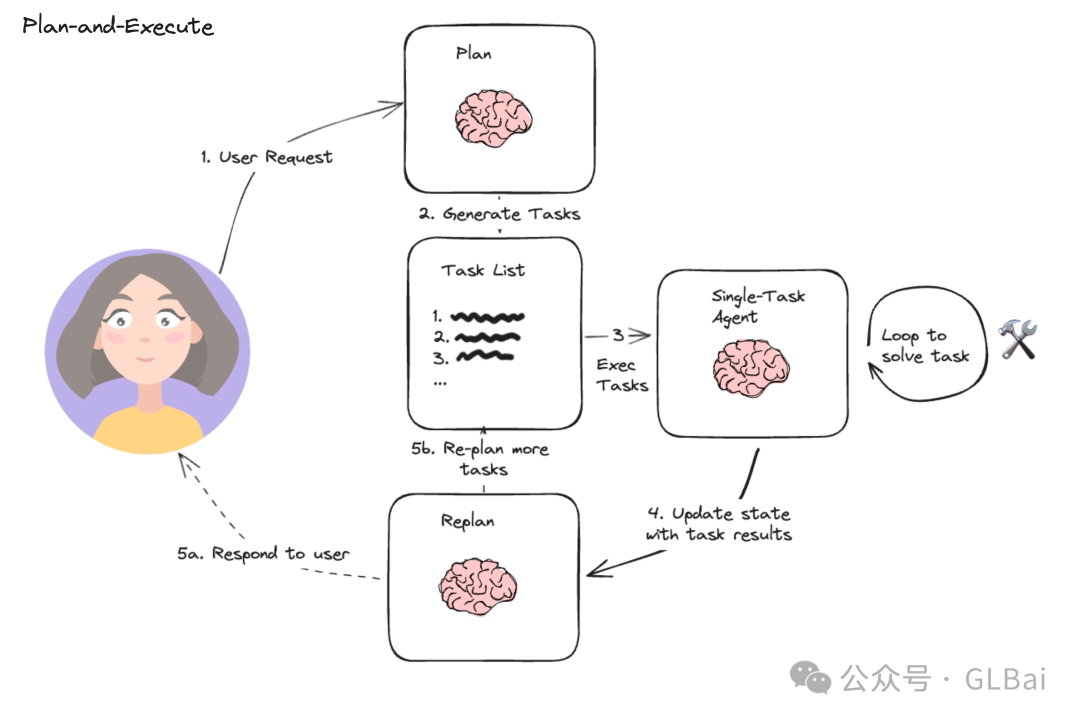
Many people’s understanding of AI Agents may have started from Plan-and-Execute, such as AutoGPT, BabyAGI, and the domestic project XAgent.
I do not deny that Plan Agent is one way to solve problems, but it is definitely not the intelligence that an AI Agent should have.
I will not expand on Plan Agent here. After all, last year’s Plan Agent projects are still difficult to land today.
Tools offer a new problem-solving path. Developers only need to focus on two things:
-
Choose the right tool.
-
Fill in accurate, or excellent, parameters.
All optimization can start from these two aspects.
Quickly convert business know-how into Agent knowledge, improve its accuracy on the two things above, and put energy there instead of engineering.
Sam may be the king of hype, but some of what he says is not unreasonable.
If a problem can be solved by model iteration, do not spend too much energy on it. You may work hard for months, and before you even launch, the next model version solves it.
Original
This article was first published on the WeChat Official Account “白苏Elliot”: https://mp.weixin.qq.com/s/0EhccjaO-8Oero9cPzI-rw