Preface
As AI agent technology develops, how to make it truly usable in real applications has become one of the industry’s central questions. This article is based on deep testing of Zhipu AI’s newly released AutoGLM. I will look at how it performs in real scenarios, and then analyze the technical principles behind it.
I do not write about Zhipu very often, because Zhipu tends to quietly bury itself in technical research and does not send sponsored work my way. The last time I wrote about them was a year ago, when GLMs launched. Ironically, that article was about GLMs, but Coze was the one that shipped first.
From GPTs and GLMs to AI App Monetization: Where Is the Dawn for AI Applications?
The core of making an AI agent work well is Tools. If you want an agent to be useful and make users want to use it, the key problem is tools: you need to connect the things users use every day into the agent.
But this is almost impossible. Will WeChat give you an API? Will Taobao? Meituan? Dianping? Xiaohongshu?
They will not.
Either the major content platforms build agents themselves, as ByteDance and Alipay have already done in their own ecosystems, or everyone else has a hard time. There is another path, similar to RPA: Honor’s phone auto-driving, or Zhipu’s AutoGLM. Instead of directly integrating with every app vendor, it simulates human operation. You are spared trouble, and so are the vendors. If they block accessibility services too aggressively, they may hurt other users too, so they have to think twice.
But doing this well is genuinely hard. Before AutoGLM launched, I had seen many implementations and tried building some myself. Papers, slides, demos: none of them were convincing.
After two days of deep testing AutoGLM, I still saw many imperfections. But I am willing to write a piece praising it, because it really does give people renewed hope that AI agents can land in usable form. It is a big step forward.
Below, I will share the testing process while also trying to analyze how it works, and take you through AutoGLM with me.
Registration and Permissions
AutoGLM is currently still in internal testing. The application entry is inside the Zhipu Qingyan app. You can talk directly to the AutoGLM beta application assistant and submit your request.
Zhipu turned a traditional form submission into a tool call inside a conversation. The experience is much better, and I want to give them credit for it. We used a similar idea when building anthropomorphic customer service before: conversational interaction, extracting information from natural language, then submitting it through tools. It feels more like talking to a person than filling out a cold form.
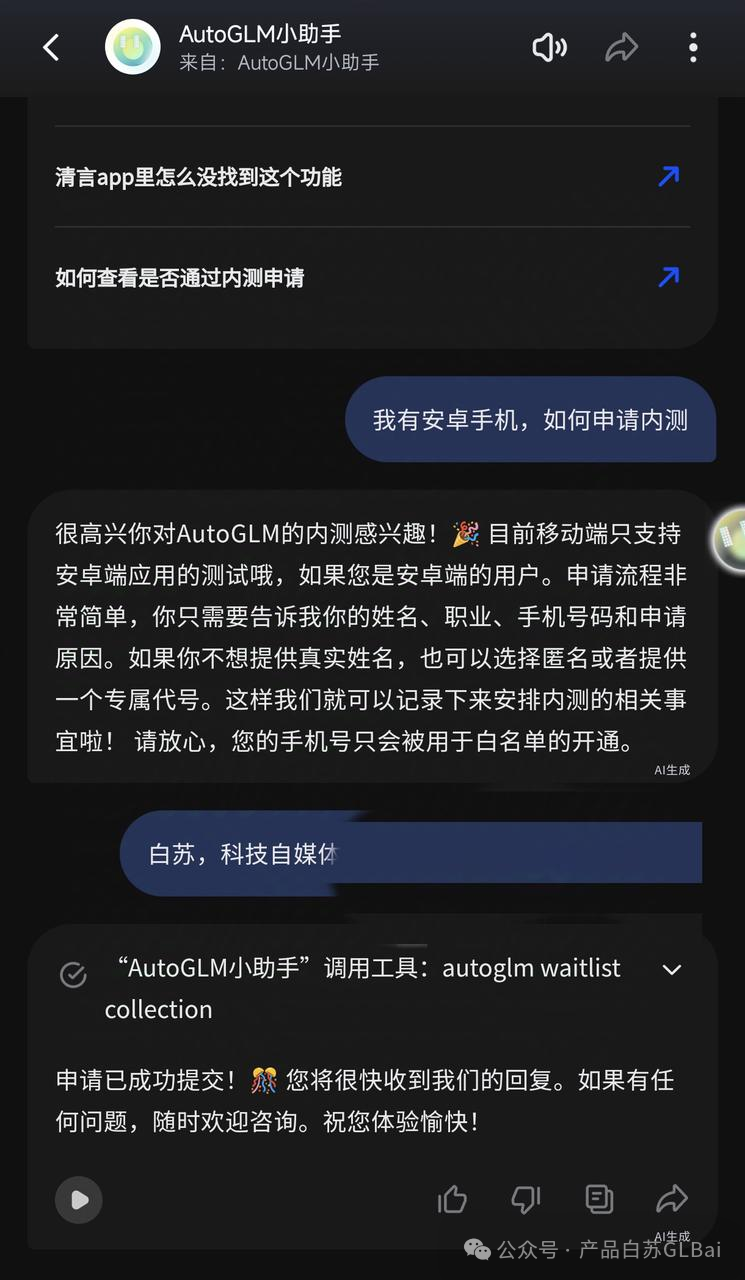
For now, it only works on Android devices. I expect iOS will not be supported for a long time.
The reason is that data acquisition and operation are controlled through Android accessibility permissions.
AccessibilityService is a system-level API that can simulate operations. After the user grants the app accessibility permission, it can simulate actions and control the user’s phone. Accessibility is widely used in apps for grabbing red envelopes, auto-replies, one-click permission access, and similar tasks.
But once accessibility service is enabled, because it needs to monitor the phone in real time, it can theoretically cause lag. There is also a privacy issue.
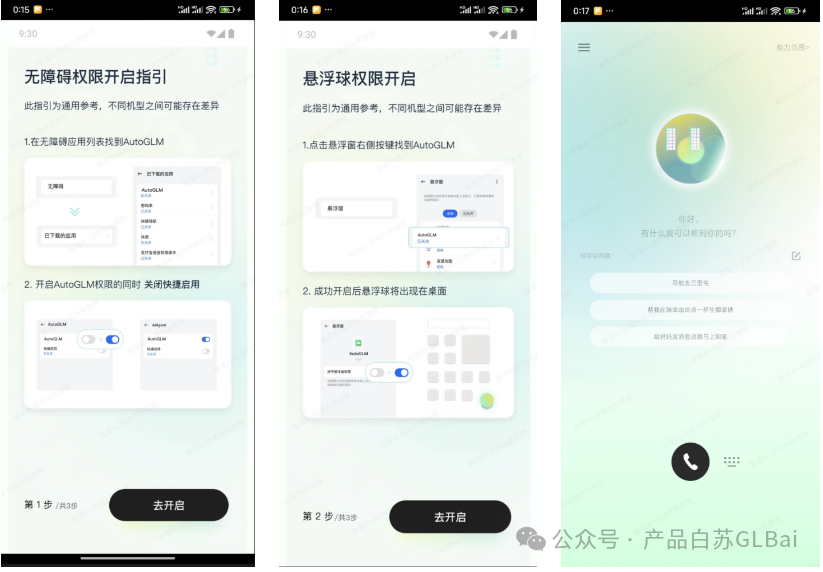
So after logging into AutoGLM, the first thing it does is guide you to enable accessibility permission and floating-ball permission. Without those, you cannot continue the experience.
Once the permissions are granted normally, you enter the home page.
Capability Scope
On the top right of the home page, there is a capability scope page. It lists what AutoGLM can currently do.
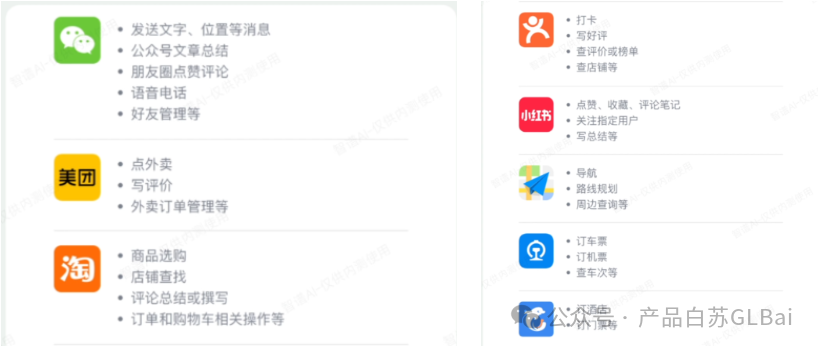
So AutoGLM is not general-purpose. It can only operate within limited applications and scenarios.
After all, AutoGLM is driven by a large model, so it also needs knowledge of these scenarios to know how to operate each app.
Also, if the same instruction can be satisfied by several apps on your phone, which one should it choose? It is better to start by covering mainstream applications first.
Writing a Dianping Review
This test asked it to help me write a Dianping review.
I have always wanted an agent to help me write Dianping reviews and level up my account, so I tried building something like this before. I found it very difficult.
For an agent to write a review for me, it needs at least these abilities:
-
Complete context information, such as restaurant information, popular dishes, review content, and the correct app operation path: where the review is written and how to get to that page.
-
The ability to operate the app, including but not limited to opening apps, clicking, swiping, double-clicking, inputting or pasting, and long-pressing.
-
Multimodal recognition and grounding ability, which means recognizing targets and giving coordinates for precise clicks.
-
Agent ReAct ability, meaning it can judge the next step based on the task goal and the current page.
The first half of item 1 is not hard. At least you can pass context by giving more detailed and accurate instructions. In Zhipu’s demo videos, the instructions are very detailed.
The second half could theoretically also be passed through instructions, such as: “Help me write a five-star review for the second restaurant in Dianping -> My -> Pending Reviews.”
But this is definitely not the experience users want. Saying that much is tiring.
In testing, I found that AutoGLM could basically walk the correct path in the mentioned scenarios. It probably received a lot of dedicated training so the model knows the correct paths in different apps, or can judge the page through multimodal recognition.
Item 2 is the simplest part. Anyone who has done Android automation testing should be familiar with this. Mature tools existed before large models. The one I used before was ui automator2. You can wrap such tools as agent tools for calling.
Item 3 is the hardest. Given a UI screenshot, it needs to judge what each element corresponds to: back button, input box, search box, jump link, and so on. In the example above, it even needs to recognize a rating component.
It also needs to judge accurately where to click. Humans may not always do this well either.
This was the part that surprised me most during AutoGLM testing. Their grounding model is rumored to be quite strong, and the experience matched that rumor.
Item 4 depends mainly on model capability and agent framework design.
Summarizing a WeChat Official Account Article
This task is not very complex. The interaction chain has relatively few steps.
The pleasant surprise: during search, it first clicked into Official Accounts, reducing the noise for the next content filtering step.
The annoying part: I do not know whether my Mandarin pronunciation was not standard enough or whether ASR was the problem, but content recognition often went wrong. WeChat Official Account search also requires very precise input.
Ordering Takeout
I tested ordering takeout several times.
The first attempt failed because a pop-up appeared in the middle of execution, causing a click error.
The reason is that AutoGLM’s click logic first takes a screenshot, recognizes where to click, and sends the instruction to operate. But if a pop-up appears during that gap, AutoGLM does not know about it. So it clicked the pop-up and jumped into an ad.
There is a time gap here.
On later attempts, I made the instruction more accurate. But halfway through execution, the app presented many options, and AutoGLM did not know which one to choose. It paused the flow and asked me which burger I wanted.
This interaction was actually good. Even if a user is operating by themselves, they also need to see the menu before deciding what exactly they want to order.
The kind of official demo where all information is described in detail at the beginning is not very consistent with normal user behavior.
This is also why I used to dislike planning agents. You cannot correctly plan everything at the very beginning. There will definitely be new information and feedback in the middle.
For example, if I want to order milk tea late at night and the shop is closed when the agent selects a store, should it ask me what to do next at that moment, or just end the task?
Is This Just a Macro Recorder?
After watching AutoGLM’s official demo, many people may say: isn’t this just a macro recorder or a script?
It is not.
I deliberately tested different inputs to check whether it was implemented through rules or scripts.
For example, two similar queries:
- “Help me buy a cup of coffee.”
- “Help me buy a bag of coffee beans.”
The first opened Meituan. The second opened Taobao.
If such similar tasks were implemented through rules or scripts, anyone who has done product or code work should know the difficulty would be very high. It is not realistic.
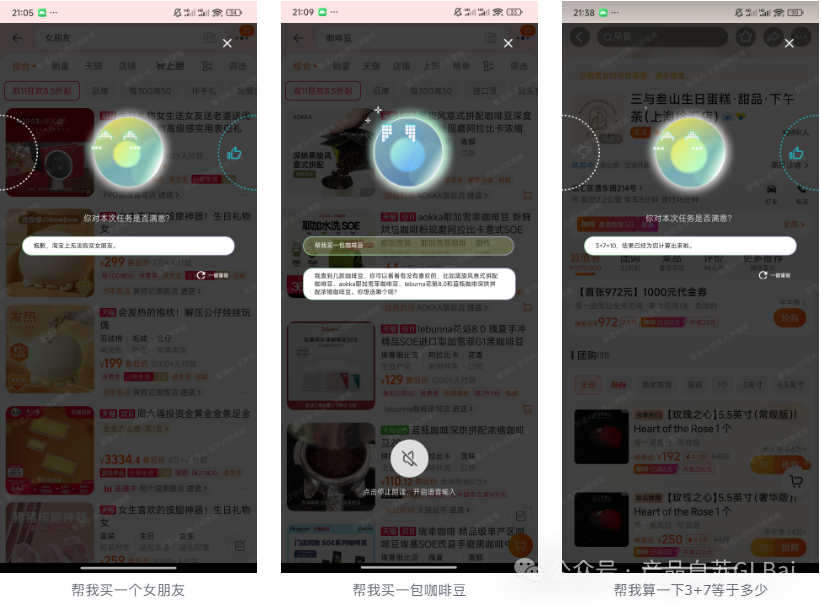
My guess is that opening different apps is also packaged as a tool. When the user query comes in, the model is forced to call this tool to choose an app for operation.
If no app is specified, it chooses from a given list by default. If the user forcibly specifies an app, it will prompt.
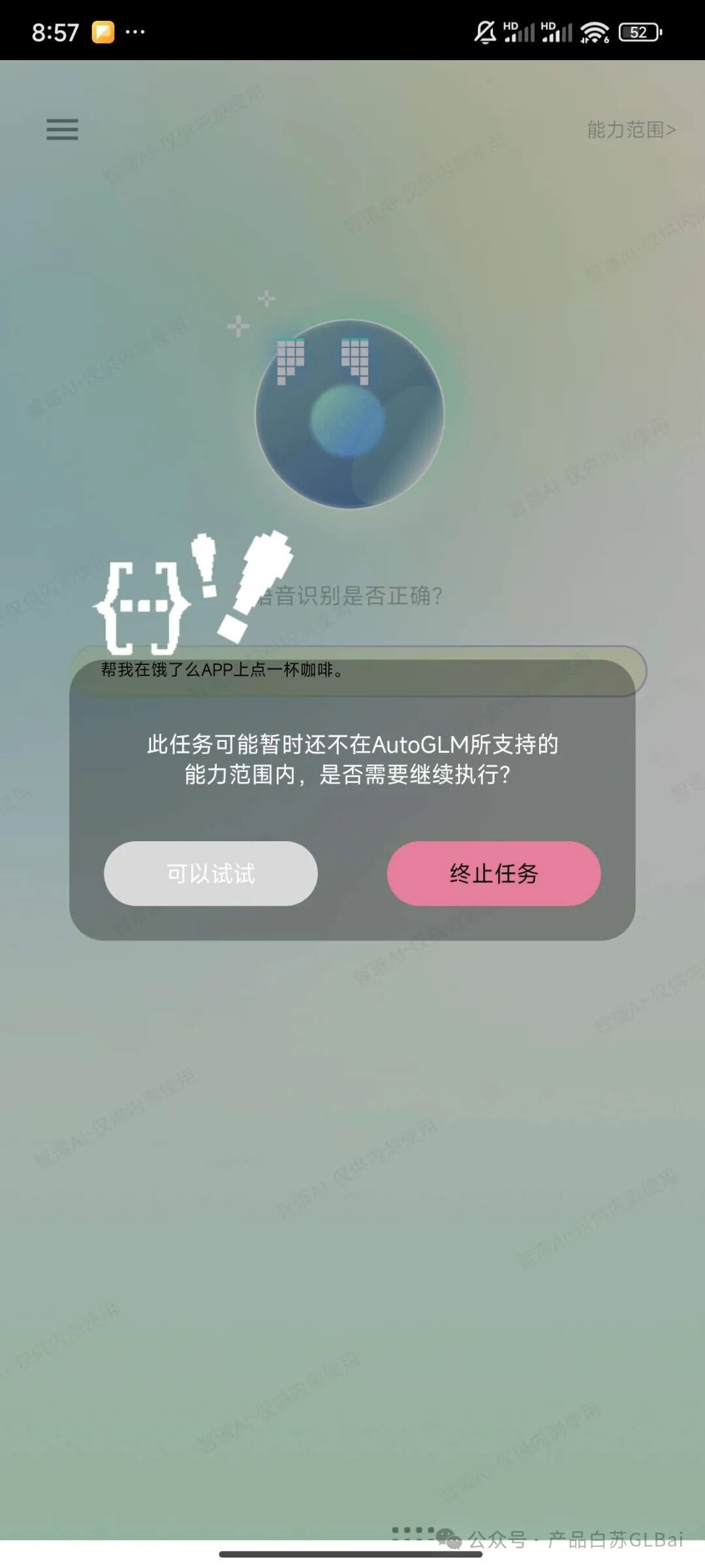
At this point, tapping “you can try” does not actually open Ele.me. It still opens Meituan from the given list.
Closing Thoughts
After several days of deep testing, AutoGLM left a strong impression on me. It showed me hope that AI agents can really land.
I still remember when I first tried to develop similar capabilities a year ago. I ran into all kinds of problems: difficult API integration, weak multimodal recognition, inaccurate operations. Those problems made it feel like usable AI agents were still far away.
AutoGLM solves many of these problems in a clever way. It does not insist on the traditional API integration route. Instead, it borrows the RPA idea and simulates human operation to achieve cross-app control.
This solution is not perfect, but it does move AI agents from the lab toward reality.
During testing, the thing that surprised me most was its scene understanding. When I said “help me buy a cup of coffee” and “help me buy a bag of coffee beans,” it accurately opened Meituan and Taobao respectively.
That is not something simple rule matching can easily achieve. It shows real intent understanding and can choose the most suitable application scenario based on user intent.
Of course, AutoGLM is still far from truly easy to use. Speech recognition sometimes goes wrong. Operation stability in complex interfaces still needs improvement. Android-only support also limits many users.
But these are problems that can be solved through technical iteration. The important thing is that it has already proven AI agent landing is feasible.
I especially appreciate Zhipu’s product thinking. They did not try to be omnipotent from the start. Instead, they chose several high-frequency scenarios and worked on them deeply.
Ordering takeout, writing reviews, reading official accounts: these everyday tasks look simple, but they involve complex technical problems behind the scenes. Doing them well is already enough to prove the product’s value.
Looking ahead, I think AutoGLM still has a lot of room to grow. As multimodal understanding improves, the supported scenarios will become richer. As operation precision improves, the user experience will become more natural.
Its appearance may change how we interact with phones, just as the first smartphone changed our lives.
Writing this, I suddenly remember the feeling of using an iPhone for the first time more than ten years ago. Touch interaction felt magical then, even though many things were imperfect.
Looking back now, those imperfections were not important. What mattered was that it opened a new era.
Maybe years later, when we look back, AutoGLM will feel like a similar turning point: the first time we truly saw the dawn of AI agents landing.
The test is over, but my expectations for AI agents have only just begun.
I hope Zhipu keeps going down this path, and I hope to see more teams bring innovative solutions.
After all, making AI truly useful for people is the shared dream of everyone in this field.
Writing is not easy. If there is anything you want me to try, leave a comment.
Original
This article was first published on the WeChat Official Account “白苏Elliot”: https://mp.weixin.qq.com/s/rA3WFV6jyJ-Ib4DXEEG7Yw