Over the past year, as large models have become stronger at multimodal work, the threshold for text-to-image generation and image-text understanding has kept falling. Building multimodal agents has also become more common.
But when we pass images and files to a large model, how does it actually “see” the multimodal information?
The principle is not as simple as pasting an image into a chat history.
Large models have dedicated multimodal input channels. Technically speaking, we are not stuffing the image itself into the text message.
Instead, we use an extra input channel to tell the model: “there is an image here” or “there is a file here.”
In other words, the model understands image content through the multimodal channel. It does not rely on image data inside the text context.
The history only needs to tell the model that an image exists. It does not need to carry the image body again and again.
When I designed Mew Design at the beginning of the year, I found that for the same 10-turn task, passing images through URLs used 4-5 times as many tokens as the ideal approach. If Base64 was used, the gap was even more exaggerated: more than 20 times.
Performance was worse. If a large model had to generate a signed URL for Jimeng 4, it took 5-8 seconds and was easy to get wrong.
So the question is: why are so many people still using Base64 and URLs?
01 - Three Pits I Fell Into While Building Mew Design
Mew Design is a design-domain multimodal agent I built early this year. It frequently calls several text-to-image models, including Jimeng 4, nano-banana, and gpt-image-1.
When a user uploads an image, the agent needs to understand it, then call these models to edit, generate, optimize, and continue the work. The whole process may involve more than 10 turns of conversation.
At the beginning, I chose the most “normal” solution, just like I would when building a regular agent: pass the image through a signed R2 URL. Even images generated by Jimeng were returned directly as signed URLs.
Then I stepped into the pits.
Pit One: Context Explodes, and So Does the Bill
Here is a real scenario.
Suppose a user generates an image, and the agent needs to talk with the model for 10 turns to finish optimization or multi-round design. In every round, the history is sent back, including all previous image references.
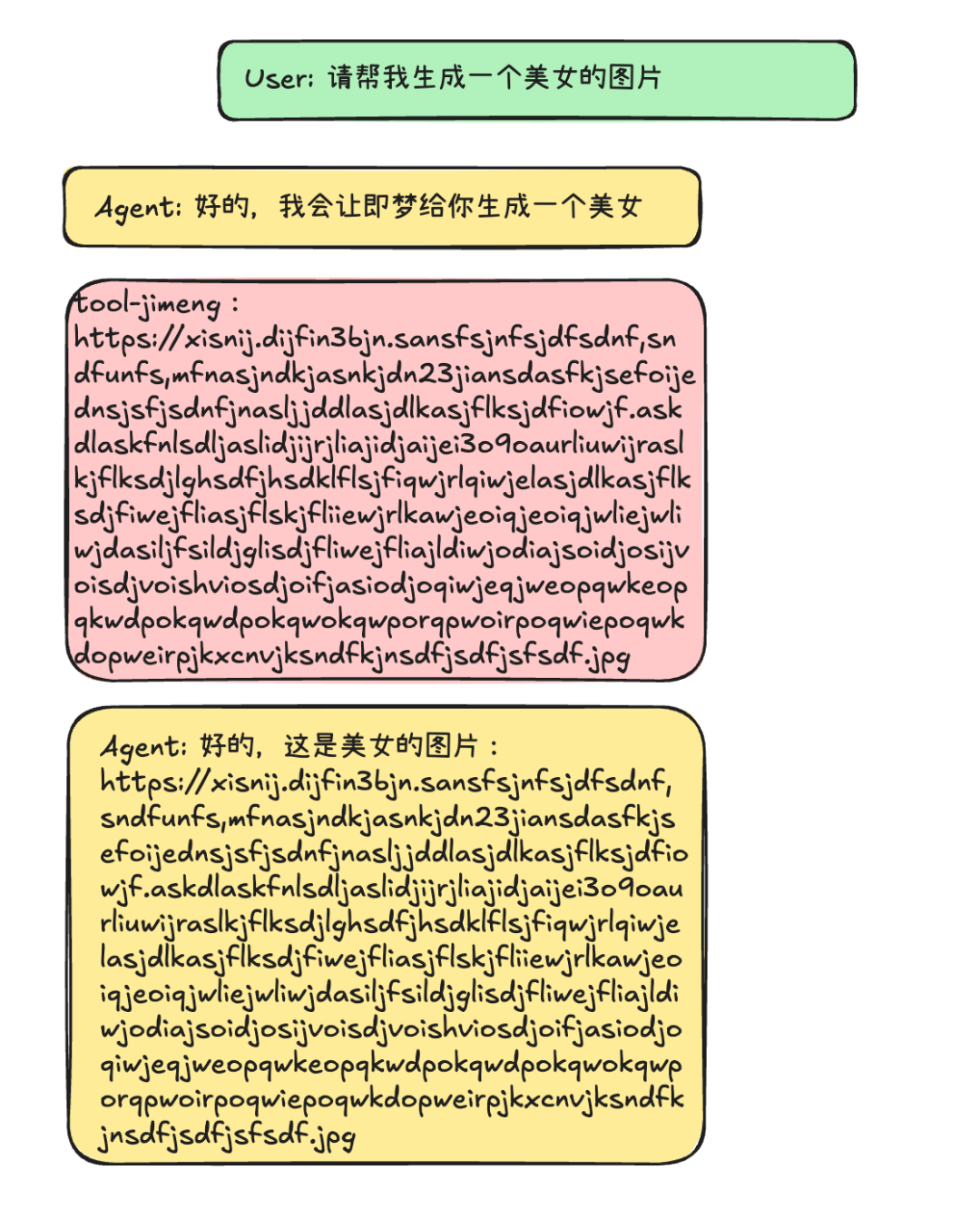
That means:
URL approach: a signed R2 URL usually has 300-500 characters, including token, bucket, path, timestamp, signature parameters, and so on.
And in every round, the system prompt and all URLs in the history are passed again.
In my own tests, a 10-turn conversation used 4-5 times more tokens than the ideal approach.
Base64 approach: even worse. A 500 KB image becomes roughly 700 KB after Base64 encoding, which corresponds to thousands of tokens.
Every round has to carry those thousands of tokens again.
After 10 turns, the token consumption can be more than 20 times the ideal approach.
The painful part is that the Base64 strings or URLs in the history are useless to the model.
Multimodal input is an independent field. It has nothing to do with the text context.
Put differently, those tokens have no value, still cost money, and damage the context.
Pit Two: Generating URLs Is Slow and Fragile
The more annoying problem is performance.
When the agent needs to call a tool, such as Jimeng 4’s image editing API, it has to pass the image to that tool. If you use URLs, the model has to generate a full signed URL.
The process looks like this:
- The model has to output characters token by token.
- A 400-character URL takes 4-8 seconds at 50-100 tokens per second.
- If one character is wrong, the whole URL becomes invalid.
- You have to retry, which costs another 4-8 seconds.
In real tests, Jimeng 4’s signed URLs were especially long because they contained many signature parameters. Generating one often took 5-8 seconds.
Large models also have a high error rate when generating long strings. One extra space or one misspelled parameter can make the whole call fail.
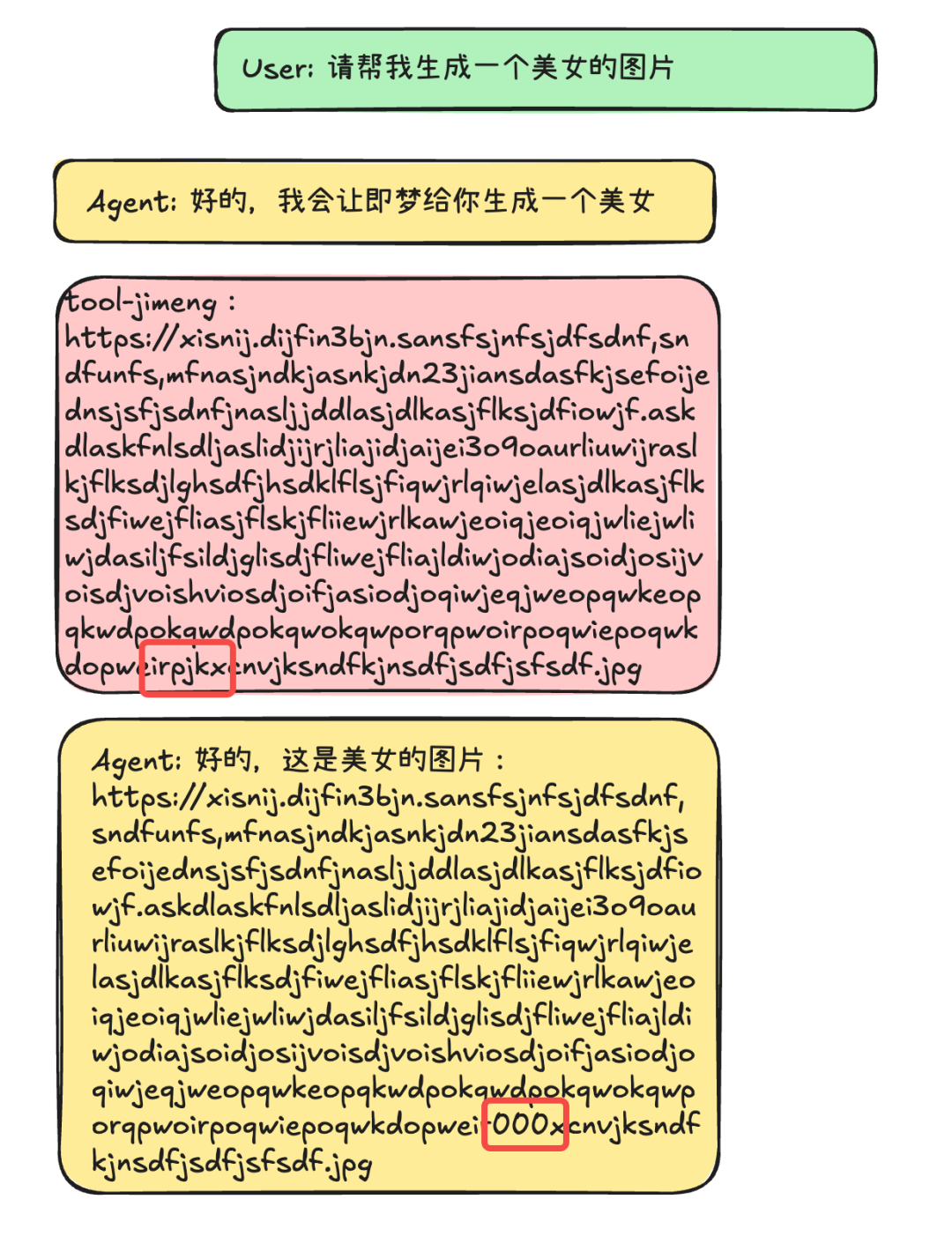
This is not something a large model should do. It is not good at it.
Pit Three: Jimeng 4 URLs Expire After 24 Hours
There is also a more hidden problem: security.
Image URLs generated by Jimeng 4 are valid for only 24 hours.
If a user generates an image today and opens the agent conversation again tomorrow, the URL in the history has already expired. The model cannot use it.
Signed URLs also usually include:
- token
- bucket
- path
- timestamp
- signature verification parameters
If context leaks or logs are not cleaned properly, the risk is high.
Base64 is worse. It is a long unreadable string, which makes review and tracing painful.
So what should we do?
I found a cleaner approach.
02 - Key Mapping: Separate the Image’s Identity from the Image Body
What is key mapping?
The architecture is simple:
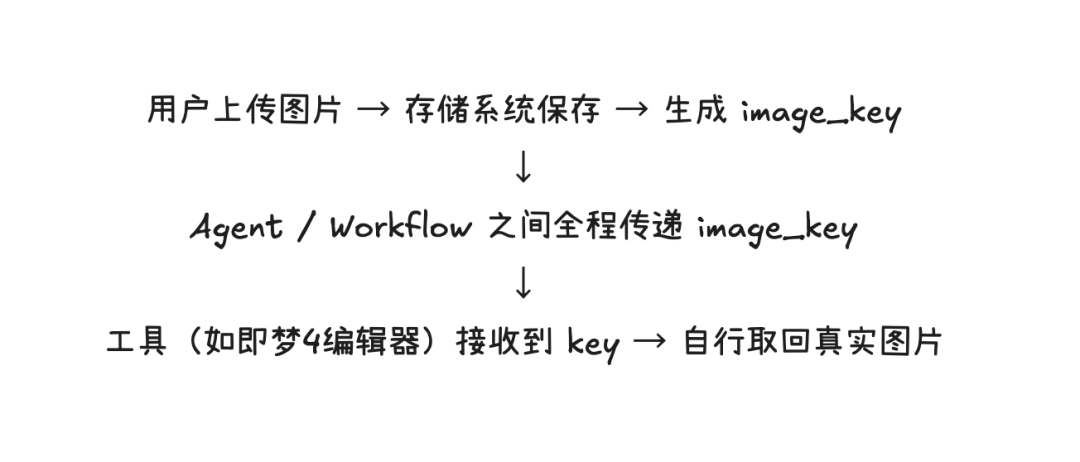
It means:
- The agent layer has no URLs and does not carry Base64.
- The context only passes keys.
- Image processing happens in the tool or system layer, not the model layer.
The core idea is to separate the image’s “identity” from its body.
The history only needs to record: “this is an image, and its key is img_001.” It does not need to know the concrete content, storage location, or access method.
When a tool really needs to process the image, it uses the key to retrieve the real image from the storage system.
The key can also be named semantically, which is friendlier for the model.
For example:
asset_logo_001-> the logo material uploaded by the userdoubao_gen_output_v2-> the second generation result from Doubaoedited_final-> the final edited version
The model can understand keys like these at a glance. You do not need extra prompt explanation, and it is much less likely to confuse them or generate the wrong thing.
How much difference did this make after the change?
03 - Real Data After the Refactor: 50% Lower Cost, 5x Faster
Cost Comparison
Scenario: the user uploads one image, and the agent needs 10 turns of conversation.
Before, with URLs:
- The signed URL was repeatedly passed in the history of every turn.
- The repeated system prompt added more overhead.
- Token consumption was about 2x the key approach.
After, with keys:
- Only a short key is passed.
- Even when the history grows, the token cost of the image reference is almost negligible.
- Token consumption dropped by 50-70%.
If you use Base64, the gap is even bigger. The key approach can save more than 95% of the tokens.
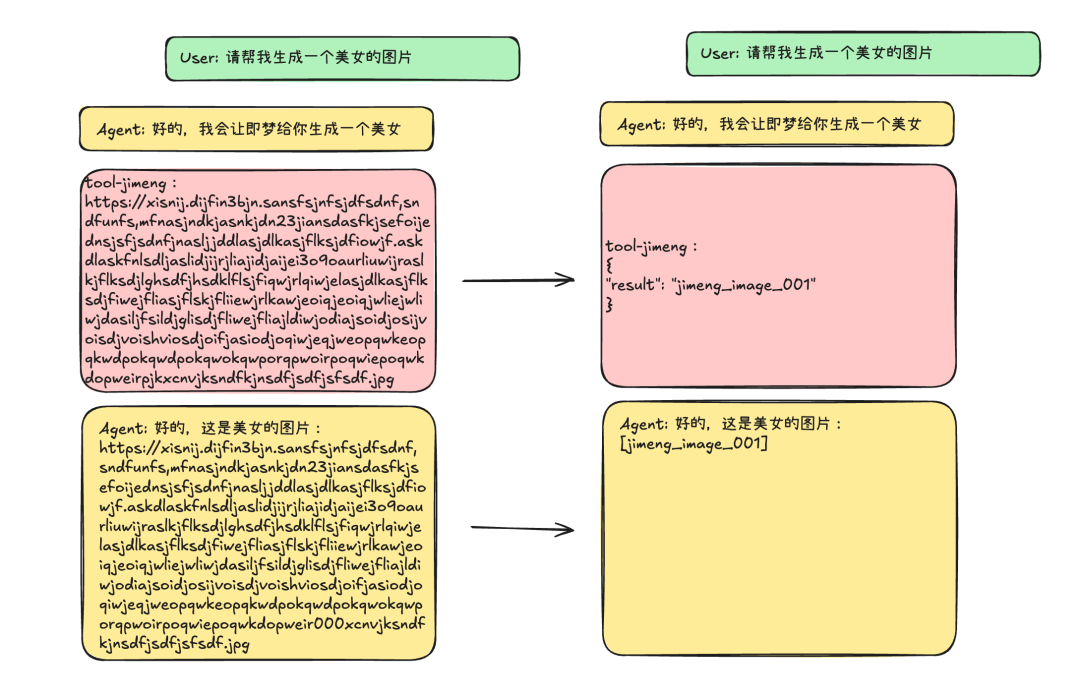
And that is only for a single conversation. If your system processes thousands of images every day, the gap compounds quickly.
Performance Comparison
Before: average end-to-end response time was 15 seconds.
After: average end-to-end response time was 3 seconds.
Improvement: 5x.
The reason is simple: the model no longer spends 5-8 seconds generating a long URL, and it no longer retries because of character mistakes.
The output is normal text. That is what large models are good at.
Stability Comparison
Before: URL generation error rate was around 10%, and retries were needed.
After: key generation error rate was 0%.
Security Comparison
Before:
- URLs contained sensitive information such as tokens, buckets, and signature parameters.
- They expired automatically after 24 hours.
- Base64 was unreadable and hard to audit.
After:
- The history contains only abstract keys such as
img_001. - Key lifecycle can be controlled.
- The toolchain decides whether a key is accessible based on permissions.
- There is no expiration problem in the conversation context.
There was also an unexpected benefit.
04 - The Unexpected Benefit: Cross-Tool Collaboration
A user uploads one image, then it may go through several steps:
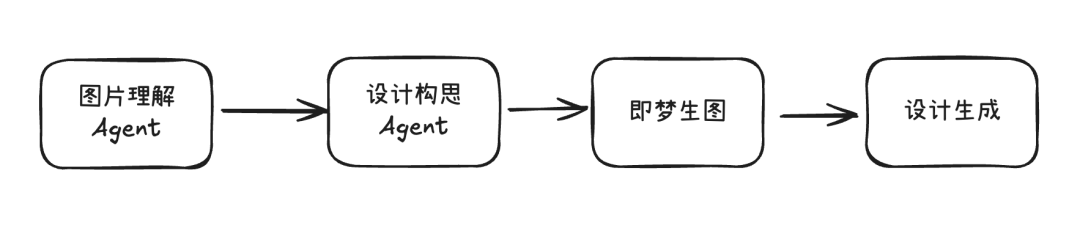
Traditional approach: every tool has to regenerate or pass the image again, or create a new URL.
Key approach: the whole conversation only passes the key, and the image is uploaded once.
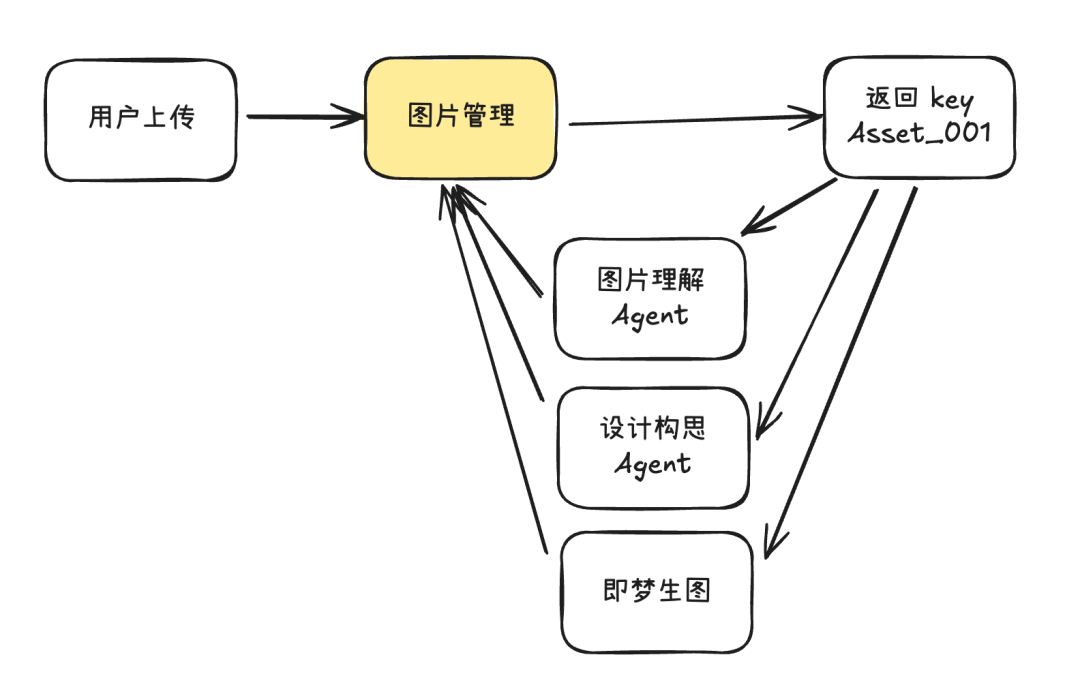
The key approach naturally forms a unified image reference protocol. It lets a multimodal agent assemble tools almost like building blocks.
Many teams now use MCP to connect multimodal models, tools, and workflow builders. In that kind of setup, key mapping is especially useful.
So how do you implement it?
05 - Three Steps to Refactor
Step One: Build Image Storage and Generate Keys
Images can be stored in a CDN or object storage. The real image address does not need to be exposed to the agent.
The backend should map it to a short key.
After each image is uploaded, generate something like this:
{
  "image_key": "img_001",
  "file_path": "s3://bucket/images/...",
  "metadata": {
    "upload_time": "2024-02-18T10:00:00Z",
    "user_id": "user_123",
    "format": "png",
    "size": 500000
  }
}
Step Two: Use Keys Consistently in Model Calls
The history can look like this:
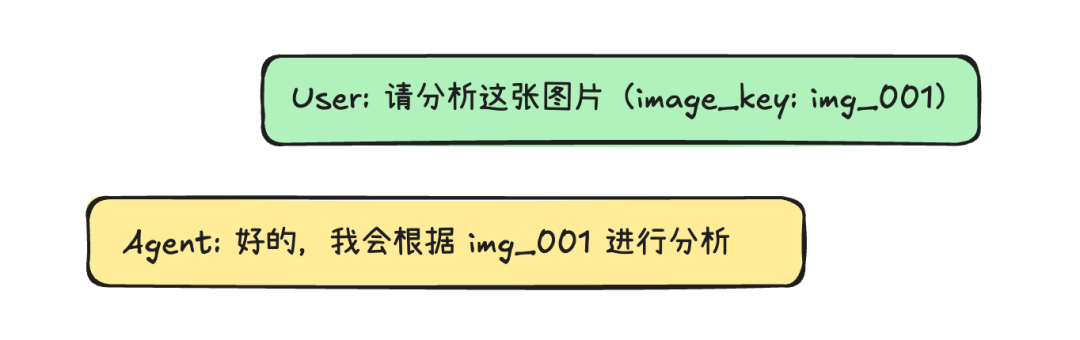
Clean, readable, and traceable.
For frontend rendering, you can define your own rules: extract the key, then replace it with the real image for rendering.
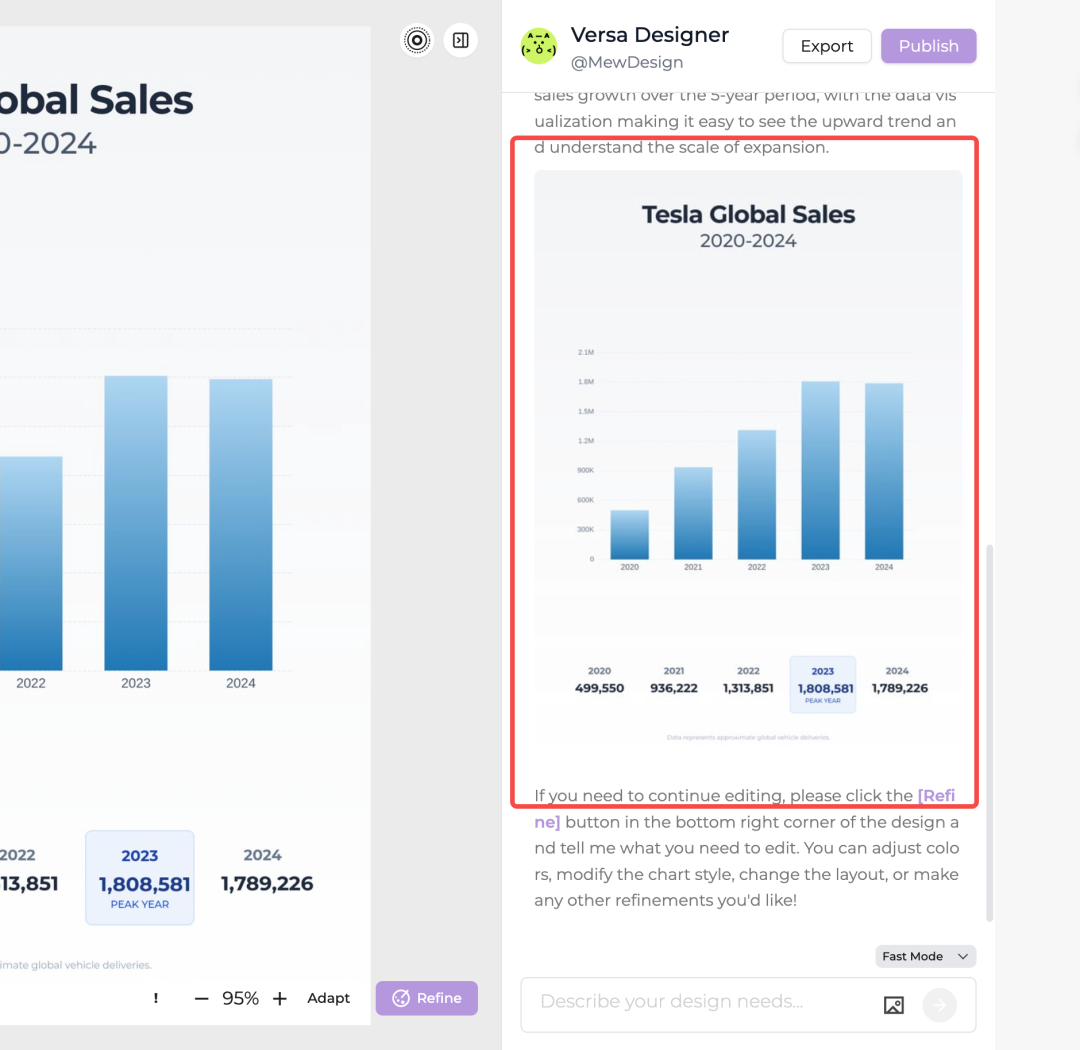
For example, the boxed area in Mew Design is rendered from a key, not from a URL.
Step Three: Let Tools Resolve Images by Key
Each tool only needs to do one thing:
function resolveImage(key) {
  // Retrieve the image from the storage system by key.
  return storageSystem.get(key);
}
This lets you reuse cache and implement permission control.
Suggestion: Use Semantic Keys
Use meaningful keys rather than random strings.
For example:
user_upload_001-> the first image uploaded by the usergen_v1_jimeng-> the first version generated by Jimengedited_final-> the final edited version
Keys like these are easier for both humans and models to understand.
06 - Summary
The right architecture for multimodal agents is:
The model reasons. Tools handle image processing. Context only records references.
The result:
- Cost: save 20-100x
- Performance: 5-10x faster
- Security: no URLs, no Base64, no expiration problem in history
- Maintainability: cleaner and more readable code
- Cross-tool collaboration: naturally compatible with MCP and multimodal ecosystems
If you are building a multimodal agent, an AIGC product, or a workflow system, this is worth trying.
Original
This article was first published on the WeChat Official Account “白苏Elliot”: https://mp.weixin.qq.com/s/FgmDybV-gZ27C3tBtepE7g