What is the hottest term this year? Vibe Coding.
You talk hard at tools like Claude Code or Cursor for a few minutes, and an entire project codebase gets generated.
But do you know what happens next?
99% of Vibe Coding projects eventually die at localhost:3000.
Why?
Because AI only helps you write code. Between code and product, there is still one final problem:
deployment, global acceleration, security protection, cost control…
These things scare away almost every Vibe Coding beginner. Even among traditional developer experts around you, few can truly understand all of it.
Since you are already vibe coding, you probably also want to handle these things yourself, or bring your AI assistant along.
But the smarter approach is to find a professional and cheap, ideally free, platform to solve these problems for you.
I am Baisu, co-founder of Mew.Design.
In today’s article, I want to properly recommend Cloudflare, sometimes called the cyber bodhisattva. Yes, the same Cloudflare that often makes ChatGPT inaccessible to you.
I will share practical experience on saving money, improving speed, and getting benefits. Trust me, after reading this you will find:
Going from code to product is not actually that hard.
01 - Why Do 99% of Vibe Coding Projects Die?
First, a cold fact: code is not product.
Programmers do not all understand operations either.
Code written by AI still needs to be built, deployed, and continuously operated.
If you want to truly deploy and publish a project written with AI help, you often need to do the following.
If it is a web service:
- First, register a domain.
- Buy a server.
- If the service faces mainland China, file for ICP registration.
After all that:
- Build and publish your code.
- If you have backend services, prepare a database.
- If the site has many static assets, for example image generation, you need object storage.
- If you are going overseas, consider access speed across countries and regions. You need CDN.
- If the site gains some fame, you need to block crawlers, competitors, and malicious DDoS traffic appropriately.
First, set aside whether you know how to do all this or where to do it.
There are already so many cloud providers, and each provider has a bewildering variety of services. Which one is good, which one is a trap?
Few people can explain all of this clearly.
For example, why have I not used AWS much? Because I still have not really figured it out.
Let alone ordinary beginners.
Even if you barely figure it out and configure the service, fine, then wait for the bill.
If there is no traffic, fine. If traffic rises a little, the bill may make you cry. In our first month using Tencent Cloud object storage, we forgot to enable compression, and it burned almost 500 yuan in the first month, before we had even officially launched.
02 - Why Can Cloudflare Be Called a Cyber Bodhisattva?
Okay, enough setup. Let us get practical.
To be a bodhisattva, first you must be useful. Only then does kindness, meaning free, matter.
Cloudflare’s Global Network: Born for Going Overseas
First, one number:
Cloudflare has 330-plus data centers around the world.
What does that mean?
It means after your code is deployed, it is automatically distributed to 330-plus nodes globally.
When users access it, traffic is automatically routed to the nearest node. It does not matter whether users are in Europe, America, or Asia.
Latency is basically within 50ms.
You do not need to:
- ❌ Buy servers in every region.
- ❌ Configure complex CDN acceleration.
- ❌ Build load balancing.
You only need to:
✅ Deploy once, and it works globally.
For overseas products, this is simply a heaven-sent tool.
For example, Mew.Design is an AI design tool facing global users, with most users in Europe and America.
If we used traditional cloud services, I would need to buy servers in the US, Europe, and Asia, then set up global load balancing. Monthly server cost alone would be tens of thousands of yuan.
For us at the beginning, that was an unaffordable cost.
But with Cloudflare?
I deploy once, and global users can open it instantly.
Cost? Maybe a few dozen dollars.
Sometimes the free quota is enough.
Zero-Configuration CDN: Acceleration Without Thinking
How does traditional CDN work?
- Buy CDN service.
- Configure origin.
- Configure cache rules.
- Configure origin pull strategy.
- Configure SSL certificate.
- Debug and optimize.
You can spend a whole day on it and still not understand it.
What about Cloudflare?
You do not have to do anything.
Connect your domain to Cloudflare, and it automatically helps you:
- ✅ Cache static resources.
- ✅ Compress transferred data.
- ✅ Optimize image loading.
- ✅ Configure SSL certificates.
- ✅ Enable HTTP/3.
It works out of the box. No brain required.
More importantly:
Traffic cost is extremely low, even free.
Compare traditional CDN:
| Traffic | A traditional cloud CDN | Cloudflare |
|---|---|---|
| 1TB | ~$150 | $0, free plan |
| 10TB | ~$1,300 | ~$100 |
| 100TB | ~$11,000 | ~$800 |
How big is the gap?
More than tenfold.
This does not even count Cloudflare’s startup benefits.
If you apply for Cloudflare’s Startup Plan, these traffic fees may be fully waived.
Edge Computing: Move the Server Next to the User
This is Cloudflare’s strongest part:
Cloudflare Workers.
Simply put, it lets you run code directly on Cloudflare’s edge nodes.
What does that mean?
The traditional model looks like this:
User (US) -> CDN -> your server (China) -> CDN -> user (US)Traffic crosses half the Earth. Latency is high, speed is slow.
The Workers model looks like this:
User (US) -> Cloudflare US node (runs your code directly) -> resultCode runs next to the user, minimizing latency.
Mew.Design has many image-related services, not only calls to text-to-image APIs.
So every time users request something from the agent, there are massive image and font resource requests, which consume a lot of bandwidth.
Before migrating to Cloudflare, I tried many optimization methods and none worked well.
Later I split services and migrated them to Cloudflare Workers. Now Mew.Design’s performance score is above 90.
More importantly:
Workers billing is based on request count:
- Free plan: 100,000 requests per day.
- Paid plan: $5 for 10 million requests.
At least ten times cheaper than traditional cloud functions.
Security Protection: Never Pay Protection Money
Cloudflare’s best-known capability is probably WAF security protection.
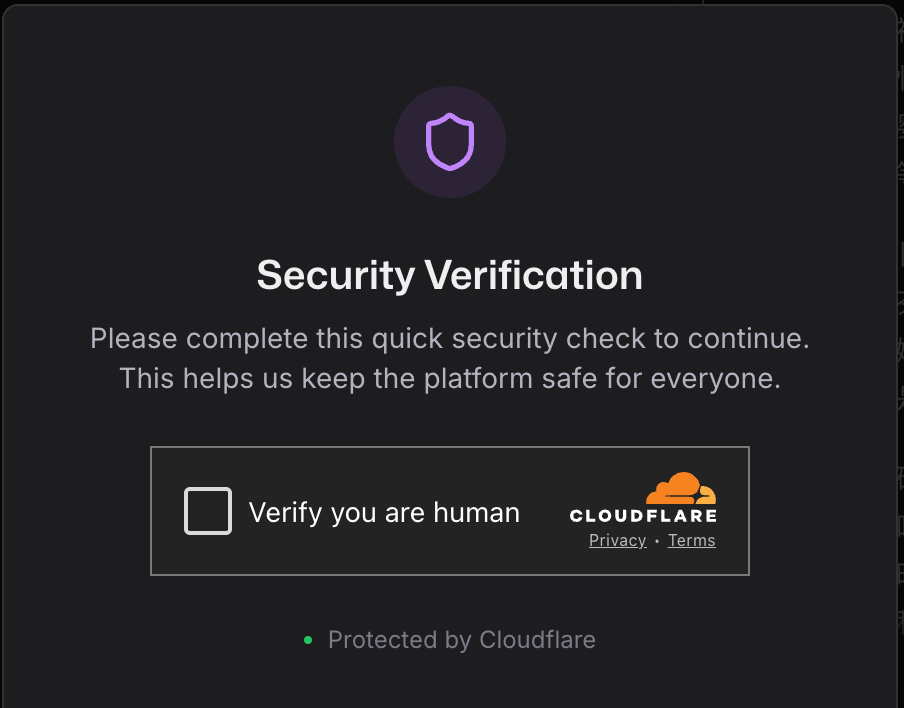
I believe you have definitely seen this. Yes, this is Cloudflare’s service.
If you have never experienced DDoS, you may not feel much, so I will not expand too much.
I only want to say: if your service is on Cloudflare, you may never have to experience it.
DDoS protection is free, with unlimited capacity.
Cloudflare claims to have resisted the largest DDoS attack in the world, peaking at 3.8 Tbps.
For ordinary developers, attacks of dozens of Gbps make Cloudflare not even blink.
And it is completely free.
From then on, you no longer need to worry about being attacked, blackmailed, or forced to pay protection money.
That peace of mind is priceless.
03 - Why Did Mew.Design Choose Cloudflare from Day One?
We stepped on many traps early on. After stepping through them, we found Cloudflare really is a bodhisattva.
90% of our users are overseas, so it must be fast.
I am actually still a loyal Tencent Cloud user, so early on many of our services used Tencent Cloud, including object storage.
Later, we found that in our business scenario, we simply could not afford it.
COS charges by traffic. Every time a user accesses something, I pay once.
Mew.Design has a huge amount of image traffic every day, and traffic fees would eat most of our budget.
Cloudflare R2’s zero egress fee became a lifesaver for us.
Also, for a startup team, there is no money and no people for operations.
Honestly, our technical team has only four people. Everyone is a full-stack builder: frontend, backend, large models, operations, everything.
I have no time to mess with Nginx, load balancing, CDN configuration, and so on.
Cloudflare’s zero-configuration nature lets me spend time on product instead of operations.
That is crucial for startups.
The most important point: it is really cheap.
I once roughly calculated the bill. If we used traditional cloud, our monthly cost would be:
| Service | Traditional cloud | Cloudflare | Saved |
|---|---|---|---|
| Servers, 3 global nodes | $300 | $0, Workers | $300 |
| Object storage + traffic | $47 | $1.5, R2 | $45.5 |
| CDN, 1TB | $150 | $0 | $150 |
| DDoS protection | $100 | $0 | $100 |
| SSL certificate | $20 | $0 | $20 |
| Total | $667 | $6.5 | $660.5 |
Saving $7,920 a year is a huge difference for a startup.
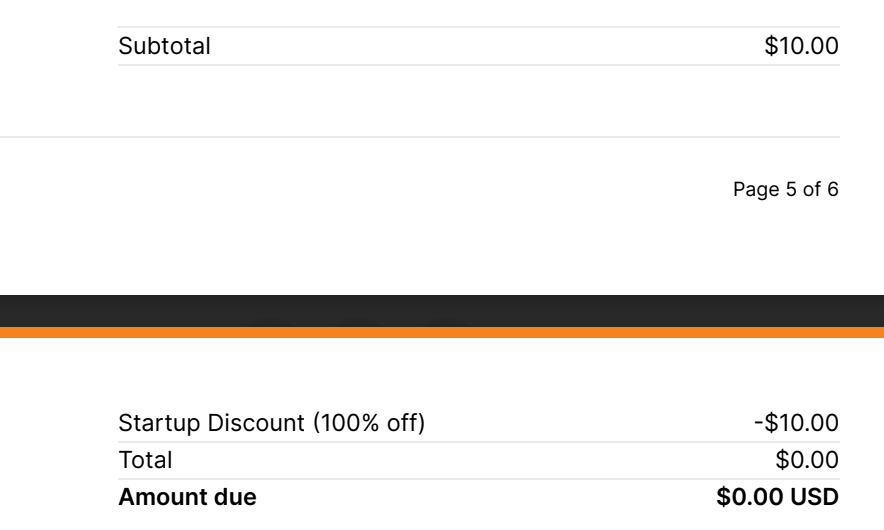
Later, we applied for Cloudflare’s Startup Program and received $5,000 in credits, so even that $6.5 was basically waived. Below is our first month’s bill: $0.
04 - How Do You Get Up to $250K in Free Credits?
Cloudflare is not only cheap; it actively gives money to startups.
Yes, real money.
And it can give up to:
$250,000.
I first saw a post on X by Teacher Liqing of Bibigpt.co about applying. I applied with a try-it-and-see attitude. Unexpectedly, a few days later, Cloudflare really gave us $5,000 in credits.
Cloudflare’s Startup Program has four tiers: $5K, $25K, $100K, and $250K.
Tier One: $5,000 Credit
Application requirements:
- Company founded within three years.
- Funding less than $3M, about 21 million RMB.
- Not currently a Cloudflare paid customer.
Is $5,000 enough?
Enough.
For most early projects, $5K lasts a long time.
Let me calculate:
- Workers: 100,000 requests/day = 3 million/month = free.
- R2: 10GB storage + 10GB upload = $2/month.
- KV: 1 million reads = $0.5/month.
- Pages: free.
- CDN: most traffic free.
You may only spend a few dollars a month. $5K can last years.
Cloudflare credits can be used on almost all services:
| Service type | Specific services | Typical use |
|---|---|---|
| Compute | Workers, Pages | Deploy apps, APIs, static websites |
| Storage | R2, KV, D1, Durable Objects | File storage, database, cache |
| Media | Stream, Images | Video streaming, image optimization |
| Security | WAF, DDoS protection, Zero Trust | Security protection, access control |
| Network | CDN, Load Balancing, Argo | Acceleration, load balancing, smart routing |
| AI | Workers AI, Vectorize | Edge AI inference, vector database |
One important point:
R2 storage has zero egress fee.
What does that mean?
Traditional object storage, such as AWS S3, charges like this:
- Storage fee: $0.023/GB/month.
- Egress fee: $0.09/GB, the big one.
If your files are frequently downloaded, traffic fees become terrifying.
Cloudflare R2:
- Storage fee: $0.015/GB/month, cheaper.
- Egress fee: $0, completely free.
For image and video products, this is basically a miracle tool.
How to Apply
The process is simple:
- Register a Cloudflare account, if you do not have one.
- Visit the application page: https://www.cloudflare.com/lp/startup-program/
- Fill in the application form:
- Company information, domestic entities can apply too.
- Funding situation.
- Current cloud services.
- Expected usage scenarios.
- Wait for review.
Usually there is a reply in one to two weeks.
After approval, credits are automatically added to your account.
Small suggestions:
- Explain your usage scenarios in as much detail as possible.
- If you have backing from an investment institution, write it down.
- If you already use Cloudflare’s free services, say so.
- Show growth potential and your need for Cloudflare.
Is It Worth Applying?
100% worth it.
Even if you cannot use that many credits for now, applying first is not a loss.
Cloudflare credits usually last 12 months.
That means you have a whole year to use them slowly.
More importantly, this money lets you put saved cost into product and growth.
For a startup, every penny is precious.
Saving cloud service money may let you hire one more person or spend more on ads.
That is the greatest value of the Cloudflare Startup Program.
05 - Get Started in 3 Steps and Deploy Globally in 10 Minutes
After all that, you may ask:
“Okay, I am convinced. But how do I start?”
Do not worry. Here is a step-by-step route.
Step 1: Register an Account and Connect Your Domain
- Visit https://cloudflare.com and register a free account.
- Add your domain.
- Change your domain’s DNS nameservers to Cloudflare’s. Cloudflare gives detailed instructions.
- Wait for it to take effect, usually 5 to 30 minutes.
After this step, you automatically get:
- ✅ Global CDN acceleration.
- ✅ DDoS protection.
- ✅ Free SSL certificate.
- ✅ Basic WAF rules.
All completely free.
Step 2: Deploy Your First Service
Of course, you can ask AI to help with all of this.
If you already have code, the fastest way is Cloudflare Pages:
# For static sites or Next.js/Remix/Astro, etc.
npx wrangler pages deploy ./dist

# Or connect a GitHub repo in the Cloudflare Dashboard.
# Automatic deployment with preview environments.
If it is an API or server-side logic, use Workers:
# Create a Worker project
npm create cloudflare@latest my-worker

# Develop and debug
npm run dev

# Deploy to Cloudflare
npm run deploy
After this step:
- ✅ Your code is deployed to 330-plus global nodes.
- ✅ User access latency is below 100ms.
- ✅ HTTPS and CDN are automatic.
Step 3: Apply for the Startup Program
Same as above, so I will not repeat it.
Final Notes
The popularity of Vibe Coding has ignited many people’s product dreams, but deployment difficulty often pours cold water on that enthusiasm.
Actually, you do not need to worry too much.
From localhost:3000 to a real product, deployment, acceleration, security, and cost are the dirty and tiring work.
Cloudflare can help you handle all of it.
More importantly, it costs almost nothing.
For people like us who want to build something, that is genuinely good news.
So if you are also a Vibe Coder, and if you also have a project lying on localhost, you might as well try Cloudflare.
Do not think too much. Register first, deploy one service first, and get it running.
If you run into problems, do not worry. Cloudflare’s docs are detailed, the community is active, and if all else fails, you can find me in the comments.
Finally, writing is not easy. If this article helped you, please support it with a like, share, and follow.
If you have any questions while using Cloudflare, or want to share your Vibe Coding project, feel free to leave a comment.
Let us turn more code into products together.
About Mew.Design:
Mew.Design is an AI Agent design tool focused on multi-text graphic scenarios, with a core promise of text without hallucination.
Try it at: https://mew.design
If you are interested in AI Agent products or Vibe Coding technical practice, follow my WeChat Official Account “白苏Elliot”. I will share more practical experience later.
Original
This article was first published on the WeChat Official Account “白苏Elliot”: https://mp.weixin.qq.com/s/U9e53b1_xhIiTMMieR2rhA